You’ve just found a piece of equipment that looks perfect for your build. The problem? It’s listed for 40 Chaos Orbs, you only have 15, and you don’t yet know whether the price is fair. While looking for an alternative, you come across listings in Divine Orbs. Some sellers require direct contact, while others let you buy the item instantly.
Welcome to trading in Path of Exile.
As in other loot-driven ARPGs focused on character builds, an item’s value depends on how useful it is. In Path of Exile, crafting currency items also serve as payment, and every league develops its own market. For years, trading meant opening the official website, searching for an item, messaging the seller, visiting their hideout, and completing the exchange manually.
Faustus and the Currency Exchange arrived in 2024, making it far easier to exchange currencies and materials. In October 2025, Merchant’s Tabs expanded the system, allowing players to buy and sell equipment without the buyer and seller having to meet.
Revised October 20, 2026. This guide covers Path of Exile 1 only, including trading rules introduced in 3.27 and relevant 3.29 adjustments. All example exchange rates are hypothetical: listing prices and exchange ratios vary by league and over time.
Learning to trade means choosing the right system, comparing equipment, and understanding the cost of each transaction. The walkthroughs below show how to buy items, create listings, monitor orders, and organize stash tabs without confusing the in-game economy with the Points store.
Nesta matéria
How Does the Path of Exile Economy Work?
Path of Exile uses items called currencies both to modify equipment and to trade. Spending one on crafting consumes a resource that could otherwise pay for a purchase. Its value reflects usefulness, supply, and demand; there is no fixed exchange rate between Chaos, Divine, or any other market benchmark.
Chaos, Divine, Exalted, and Mirror
A Chaos Orb randomly rerolls the modifiers of a Rare item and often serves as the reference for smaller trades. An item listed at 20c costs twenty Chaos Orbs. A Divine Orb rerolls the numerical values of existing modifiers within their allowed ranges, without simply changing the modifier types; 5 div means five Divine Orbs, a common benchmark for larger purchases.
An Exalted Orb adds a modifier to an eligible Rare item that has room for another. Its position as a high-value trading benchmark changed particularly in 3.19, when major metacrafting recipes began consuming Divine Orbs and selling a six-linked item stopped awarding a Divine. This altered supply and demand without establishing a new permanent exchange rate. Older guides that use Exalted Orbs as their main unit need that context.
A Mirror of Kalandra creates a mirrored copy of eligible equipment. Its rarity and use on exceptional items place Mirror trades in a category of their own. Mirror services involve extra terms and trust: the Mirror’s price, the service fee, and the copied item’s quality are separate considerations.
Gold and Points Have Different Purposes
Gold, introduced with Settlers of Kalguur, cannot be freely transferred between players like Chaos or Divine. It’s used for services and operating costs: you might have enough currency to pay for an item but not enough Gold to complete its instant purchase. That fee does not make Gold a directly tradable player currency.
Points belong to the official microtransaction store, where players purchase stash tabs and other products. They aren’t Currency Exchange funds or payment for another player’s item. Stash tab prices in Points appear later in this guide and must not be confused with prices in the character economy.
How Does Trading Work Today?
The methods complement one another. A direct trade requires both players to be available. Official search finds offers, but each listing determines whether delivery will be manual or automatic. The comparison below separates the search tool from the system that actually transfers the item.
The Trade Market, added to PoE 1 in update 3.27, provides search features inside the game. On PC, the default shortcut is the comma key (,); on a controller, open it from the pause menu. Finding a listing there does not make every offer an instant purchase.
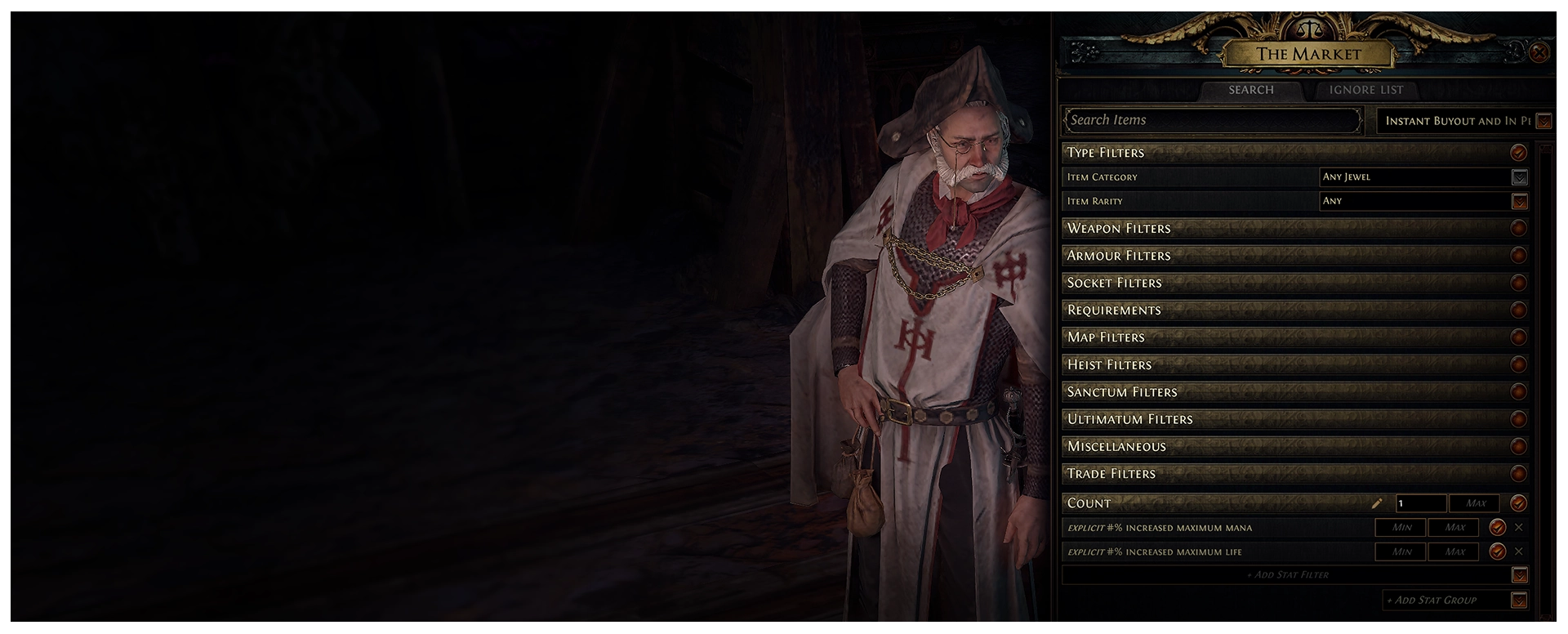
The Currency Exchange matches orders for eligible resources. Merchant’s Tabs list individual items for automated purchase, even while the seller is offline. A regular Premium Stash Tab advertises items for manual trading. The right choice depends on the item and the available sale method, not just which interface feels easier.
| What you want to do | Most suitable method |
|---|---|
| Buy eligible currency or materials | Currency Exchange |
| Find Rare equipment | Official Trade or Trade Market |
| Instantly buy equipment offered for automated sale | Merchant’s Tab |
| Exchange an item directly with someone | Manual trade |
| Sell equipment while offline | Merchant’s Tab |
| List items without an automated shop | Premium Stash Tab or another supported manual method |
| Compare modifiers and prices | Official Trade website |
In 3.29.3b, GGG fixed pseudo-modifier displays in Trade Market search results. Search URLs on the website also began encoding the full query rather than relying on short identifiers. When sharing a current search, copy its complete URL; don’t reuse an old guide’s short code.
How to Buy Equipment From Other Players
The most important starting point when learning to trade is the official trading website.

1. Select the Correct League
Before searching for equipment, verify the selected league. Listings in a temporary league aren’t automatically shared with Standard or other leagues. If your character belongs to a trade league, search within that league.
2. Search for a Unique Item
Suppose your build uses Tabula Rasa. Enter its name, select the matching result, and examine the available listings. The displayed prices are sellers’ asking prices, not proof that every item sells at that market value. Also check corruption, sockets, and any special properties that matter.
3. Search Rare Equipment by Its Modifiers
Rare equipment searches are more complex because many modifier combinations are possible. Imagine you need boots with:
- Maximum Life;
- Fire Resistance;
- Cold Resistance;
- Movement Speed.
Select boots in advanced search and add filters for the desired stats. You might set a minimum of 30% Movement Speed and adjust resistance thresholds to your build’s needs.
Illustrative example: if very few results appear, lowering a minimum resistance requirement from 40% to 30% may reveal much cheaper boots. That’s not a fixed pricing rule; it’s a way to find alternatives that still work for your character.
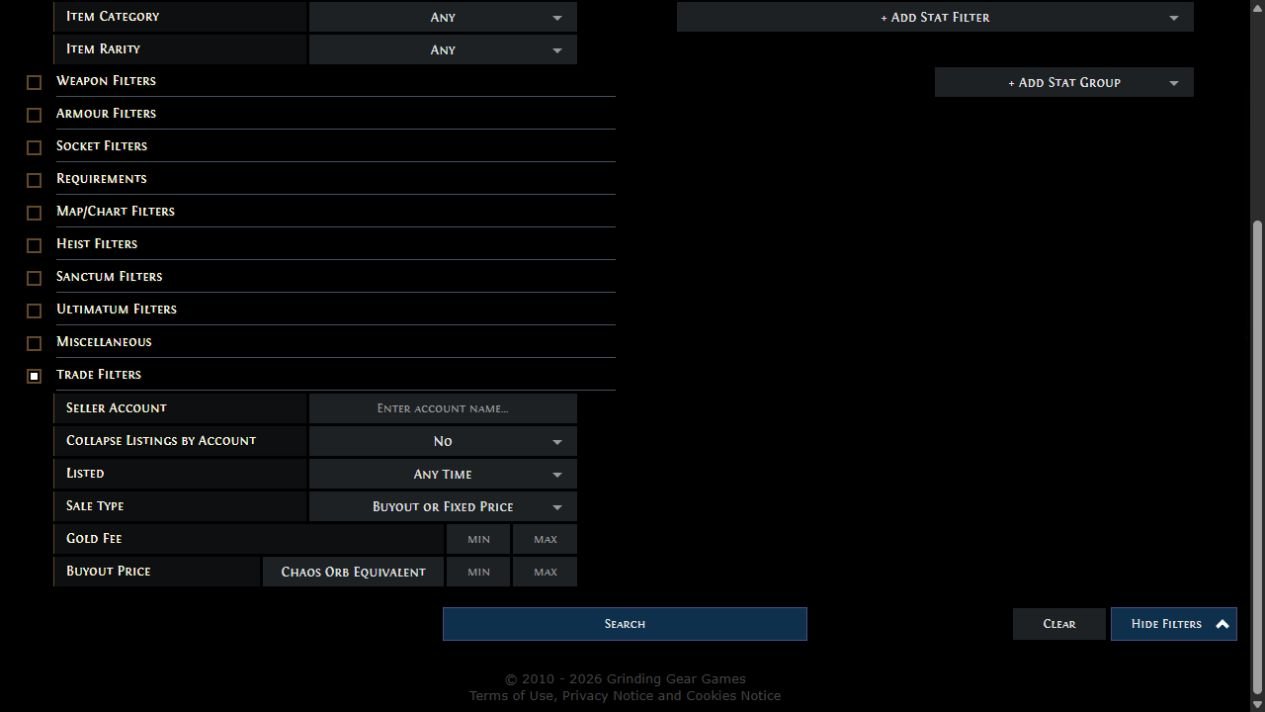
4. Understand the Key Filters
Type Filters narrow item categories, rarity, and type. Equipment Filters help find characteristics such as damage and attack speed. Stat Filters are essential for specific modifiers. You can also filter sockets, links, quality, item level, corruption, influence, and price. In 3.29, gems became usable in sockets of any color; matching the socket color now grants extra Quality.
Keep that change in mind when comparing items.
An explicit filter requires the chosen modifier to appear on the item; a pseudo filter can combine several sources. For example, filtering boots by pseudo total Fire Resistance can include items combining specific Fire Resistance and all-element Resistance. Read the filter description so you don’t demand a single affix when your build only needs the final total.
5. Tailor the Search to Your Build
A common mistake is copying every stat from another player’s equipment and demanding exactly the same values. If your build requires a particular attack-speed threshold, prioritize it. If you simply need to cap resistances, another combination may work just as well.
Buying a functional item at a fair price is usually better than paying much more for traits that barely change the outcome.
6. Compare Listings
Review prices, attributes, and differences between items. A cheaper piece may have a substantially worse important modifier or a condition that blocks a planned modification. Listings may be outdated, unavailable, or priced in ways that don’t reflect completed transactions.
7. Contact the Seller or Buy Directly
For manual trades, use the message option in the listing, generally labeled Whisper. The seller may reply and send an invitation. Accept it, visit the specified hideout, and wait for the trade window. Add the agreed currency and inspect the offered item. Check its modifiers, quantity, corruption, and payment before confirming: a similar-looking icon does not prove it’s the item advertised.
If a Merchant’s Tab listing supports automated purchase, the process differs. The appropriate interface handles the purchase, including the Gold fee shown before confirmation.
8. Verify Everything Before Paying
Two items can share a name while having different stats. Check modifier values, quantities, and every property your build depends on. Never assume the deal is correct just because the other player placed a visually similar item in the window.
Faustus: Who Is the Character Who Changed Trading?
Faustus, the Financier arrived with Settlers of Kalguur in 2024, connected to Currency Exchange and Kingsmarch trading. This reduced the need to message individual players when exchanging eligible resources. That’s where the system began historically; it doesn’t mean you must rebuild the original league’s entire town to use it today.

Update 3.26 in 2025 brought Settlers into the core game and placed Faustus in Lioneye’s Watch in Act 6. Kingsmarch is tied to endgame progression. In 3.27, after meeting him in Kingsmarch or Lioneye’s Watch, he became available in the hideout and began managing PoE 1’s new asynchronous trading system.
The two main options in this guide are Currency Exchange and Manage Shop. If one doesn’t appear, check character progression, league type, and, for the shop, whether you own a Merchant’s Tab. Meeting Faustus does not grant a free Merchant’s Tab.
Other services are location-dependent: Faustus identifies inventory items in the Rogue Harbour, whereas Rog provides that service in Kingsmarch. Gold-based passive resets are also available through progression. Don’t assume every Faustus menu contains every service offered by Kingsmarch NPCs.
Currency Exchange: How to Buy and Sell Currencies
Currency Exchange is available in leagues that allow trading and only supports resources accepted by its interface. Talk to Faustus and choose Currency Exchange. Every order gives one kind of item to receive another; buying and selling are simply opposite directions of the same operation.

Creating an Order: I Want and I Have
- Under I Want, select what you want to receive. To buy Divine Orbs with Chaos, choose Divine Orb.
- Under I Have, select what you’re paying: Chaos Orb in this example. Double-check the names before entering numbers.
- Enter the desired amount and ratio. Compare current offers in your league; never copy an old quote without checking the direction and total.
- Read both final quantities and the Gold fee. Confirm only if the numbers match the trade you intend.
- Place the order and track its status. Once executed, collect the received resources through the interface.
Entirely hypothetical example: imagine that 1 Divine costs 200 Chaos. Receiving 2 Divine would require 400 Chaos plus the operating fee in Gold displayed by the game. These numbers demonstrate the calculation; they are not October 2026 market rates. To sell Divine for Chaos, reverse the resources: Chaos in I Want, Divine in I Have. Check the ratio and total again because available orders can differ by direction.

Pending Orders, Partial Fills, and Cancellation
A matching offer can fill your order quickly. Without a counterparty at your chosen ratio, it stays pending or may fill only partially. Some of the offered resources have then been exchanged, while the remainder stays committed. Use the orders panel to distinguish completed trades, outstanding amounts, and items ready to collect.
If you no longer want the unfilled portion, cancel it from that panel and collect the returned balance. Cancellation does not undo completed trades: resources obtained from a partial fill remain yours. Before placing a new order, collect all balances and check actual amounts instead of pretending the previous order never executed.
Gold Costs and Eligible Materials
Gold is charged when placing the order, separately from the currencies you give. The calculation depends on resources and quantities; there is no universal fee in Chaos or fixed percentage that works for every material. Version 3.27 lowered costs for various basic currencies and Lifeforce, while 3.29 increased Chromatic Orb costs. The applicable fee is the one shown before confirming.
Supported categories include currencies, Essences, Fossils, Resonators, Scarabs, fragments, Divination Cards, Oils, and compatible activity resources. The precise selection changes with updates. Being stackable doesn’t guarantee eligibility: look for the item in the selector. Equipment with individual stats belongs in item search and suitable listing systems; Bulk Item Exchange is a separate search tool explained below.
Compare offers before confirming. A technically valid order may still be a poor deal. Availability, quantity, and demand affect the ratio; convenience does not guarantee the best price or an immediate full fill.
Merchant’s Tabs: How Automated Selling Works
Merchant’s Tabs arrived in PoE 1 with update 3.27 in 2025. Managed through Faustus → Manage Shop, they hold individual listings that other players can purchase automatically, even when you’re offline. They are not regular storage tabs. Their prices in Points are collected in the store section below rather than repeated here.
Purchasing and Converting Older Tabs
You may purchase a Merchant’s Tab in the store or convert an eligible Premium Stash Tab with the tool under My Account on the official website. The 3.27 notes confirm that PoE 1 supports conversion of Premium tabs purchased before The Third Edict launched on August 29, 2025. This is the eligible purchase cutoff, not a final deadline to perform the conversion.
Conversion permanently changes the tab’s function rather than awarding extra free storage. Previously stored items become available in a remove-only copy: you can take them out but not deposit new ones. Premium Quad tabs aren’t eligible, and buying a Premium tab after the cutoff doesn’t make it convertible. Check the conversion tool’s eligibility display first; converting all your Premium tabs could leave you without useful conventional storage.
The original shared-system FAQ documents conversion, remove-only storage, and commerce rules; it originally launched for PoE 2. Faustus and the PoE 1 implementation are instead confirmed in 3.27. An NPC named in the other game’s FAQ isn’t an instruction to find that NPC in PoE 1.
Listing an Item, Step by Step
- Search comparable items and decide on a price. A ring listed for 25 Chaos is just a teaching example, not a current market quote.
- In your hideout, talk to Faustus, open Manage Shop, and select your Merchant’s Tab.
- Add the item, set its individual price and payment currency, and check both before completing the listing.
- Wait for indexing. Buyers may find it in instant-purchase searches, but that does not guarantee a sale.
- Once sold, open Manage Shop → Earnings Tab to collect the currency. Earnings is remove-only, not a tab you can deposit items into.
Every listing needs its own price. The interface may remember the last price, but it doesn’t offer the same whole-tab pricing option as a Premium tab. You can change or remove listings subject to waiting periods. There is also a short initial window before indexing to reconsider; check a listing’s state before repeatedly editing it.
Who Pays, and What Can Be Listed?
The buyer pays the listed currency price plus the automated purchase fee in Gold. The seller receives the stated currency and pays no Gold to list or sell. Gold does not become part of the seller’s earnings. These rules are different from paying Gold to submit a Currency Exchange order. If buyers compete for one listing, the first completed purchase wins.
Resources available in Currency Exchange should not be listed through Merchant’s Tabs. The Merchant system is for equipment and other eligible items outside that exchange. Bound or untradable items keep their restrictions. For eligible stacks, the listing price covers the entire stack: verify quantity and total instead of borrowing the Premium tab’s per-unit convention. If you want 10 Chaos per item in a stack of five, the total should be 50 Chaos, not 10.
Inspect the live listing before leaving it available.
Merchant’s Tab vs. Premium Stash Tab: What’s the Difference?
Despite similar names, they solve different problems.
| Feature | Premium Stash Tab | Merchant’s Tab |
|---|---|---|
| Regular item storage | Yes | Not a normal storage tab |
| List equipment | Yes | Yes |
| Automatic sale | No | Yes |
| Seller offline | Manual sale cannot complete | Automatic purchase can complete |
| Set one price for the whole tab | Available | No, individual prices |
| Management | Stash | Faustus → Manage Shop |
| Gold charged for automatic purchase | Not applicable | Buyer pays |
| Best use | Store and manually list items | Automated equipment shop |
Both types can be useful on the same account.
A Premium Stash Tab is still great for organizing equipment and carrying out traditional trades. A Merchant’s Tab reduces the effort needed to finish a sale. You do not have to replace every old tab: combine storage and trading according to how many items you actually sell.
Stash Tabs: Which Should You Buy, and What Do They Do?
Free basic tabs provide storage; paid tabs add space, specialized organization, or commerce features. The best purchase depends on the problem you’re trying to solve: running out of space, collecting too much of a particular resource, or spending too long completing sales. This table compares practical differences rather than prescribing one purchase order for everyone.

| Tab | Main function | Who usually benefits |
|---|---|---|
| Regular / Extra | Additional storage without Premium manual listing | Players who only need space |
| Premium | Name, color, storage and public listings for manual trade | Players who want to organize and list equipment |
| Premium Quad | Four times the regular space with Premium features; not convertible into Merchant | Players storing many items; icons are smaller |
| Currency | Dedicated slots for large quantities of currencies | Players who frequently use currency items |
| Map | Organizes endgame map items | Players accumulating Atlas resources |
| Fragment | Fragments, Scarabs, and compatible categories | Players preparing advanced encounters |
| Divination | Organizes cards and sets | Divination Card collectors and traders |
| Essence | Stores Essences | Players farming or crafting with them |
| Delve | Fossils and Resonators | Players using Delve crafting materials |
| Blight | Oils and eligible Blighted maps | Frequent Blight players |
| Delirium | Delirium Orbs and Simulacrums | Players holding Delirium resources |
| Gem | Organized gem storage | Players holding multiple and special gems |
| Flask | Flasks and tinctures | Players maintaining several builds |
| Unique Collection | One copy of each Unique | Collectors, not bulk duplicate storage |
| Breach / Ultimatum | Resources from those mechanics | Players accumulating their materials |
| Merchant’s | Individual listings and asynchronous sales via Faustus | Frequent sellers or players trading offline |

For a beginner planning to sell manually, a Premium tab or a regular-to-Premium upgrade may be enough. Currency becomes useful when orbs consume many slots; Map and Fragment matter more as endgame becomes routine. A Quad may suit players who need general storage better than several specialized tabs they barely use.
Players who constantly sell equipment may combine Merchant’s with Premium storage; someone trading mostly materials in Currency Exchange has different needs. These suggestions depend on your inventory. Before purchasing a specialized tab, check what it currently accepts and whether you already have sufficient storage.
How Much Do Stash Tabs Cost?
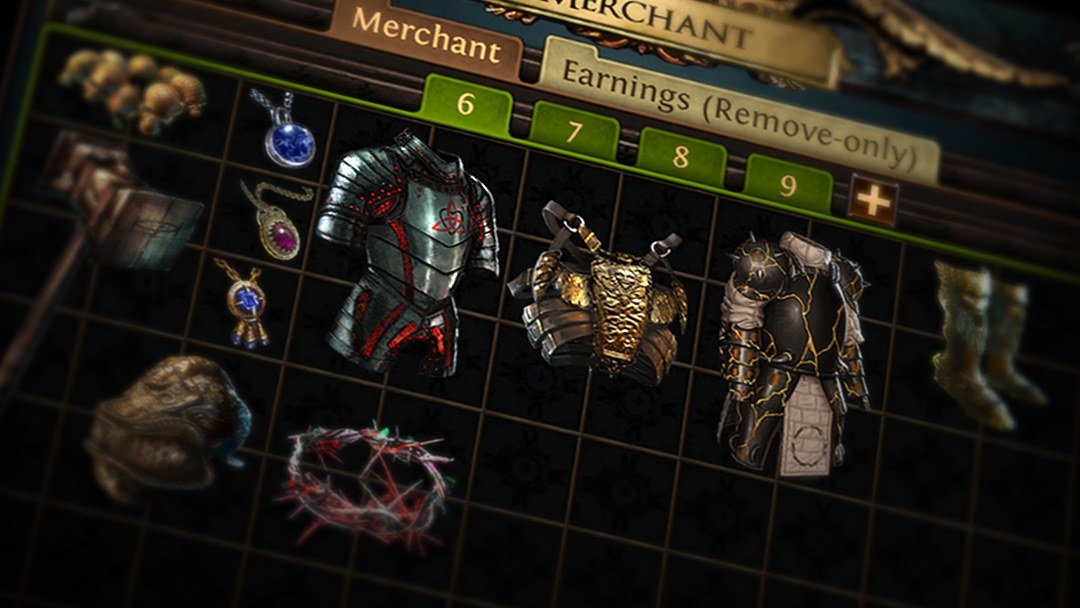
Stash tabs are bought with Points, Path of Exile’s official microtransaction-store currency. The prices below were checked in the official store on October 20, 2026. They are normal prices in Points, with no temporary sale indicated; 200 Points is the six-Merchant’s-Tab bundle. The image is an earlier store screenshot and does not replace the check date of this table.

| Tab | Regular price in Points |
|---|---|
| Extra Stash Tab | 30 |
| Premium Stash Tab | 40 |
| Upgrade to Premium Stash Tab | 15 |
| Premium Quad Stash Tab | 150 |
| Currency Stash Tab | 75 |
| Map Stash Tab | 150 |
| Fragment Stash Tab | 75 |
| Divination Stash Tab | 50 |
| Essence Stash Tab | 40 |
| Delve Stash Tab | 40 |
| Blight Stash Tab | 40 |
| Delirium Stash Tab | 40 |
| Gem Stash Tab | 40 |
| Flask Stash Tab | 40 |
| Unique Collection Tab | 140 |
| Merchant’s Tab | 40 |
| Bundle of six Merchant’s Tabs | 200 |
Before buying: check the price shown for your account and platform. Sales and future catalog changes may alter these values. The official stash tab store has the current listings.
How Do You Buy Points?
You can buy Points through the official game store using the packages available for your account and platform. Some supporter packs also include Points and other benefits.
How Do Sales Work?
Grinding Gear Games periodically discounts Stash Tabs. Various tab types may cost fewer Points during these promotions. If your purchase isn’t urgent, watch official announcements and compare the regular and discounted prices. Path of Exile’s base game is playable without purchasing tabs.
How to Organize Your Stash for Trading
Owning many tabs isn’t very helpful if items are scattered around. Separate storage, personal use, and commerce. One practical approach is a tab for equipment you still need to evaluate, another for manual sales, and Merchant’s Tabs for automatic listings. Different names and colors make their roles easier to recognize.
Stash Tabs, including free ones, can use the Affinities system, which automatically directs compatible items to configured tabs. For specialized tabs, the affinity must match the type of item accepted.
Open a tab’s options and assign the desired affinity. With Enable Tab Affinities on, quick transfers send compatible items to the chosen destination. Affinity Auto-navigation determines whether the interface switches to that tab as items are sent. It’s a navigation setting, not another purchase or a way of converting a tab into a shop.

A Simple Setup
If you’re starting to trade, you could organize tabs like this:
- Currencies: orbs and other currency resources.
- Maps: Atlas activity resources.
- To Price: equipment not yet evaluated.
- Manual Sales: items listed in a Premium tab.
- Merchant: equipment listed for automatic sale through Faustus.
These are suggested labels, not mandatory game-defined categories. The goal is to spend less time hunting for items and avoid accidentally selling equipment you intended to keep.
How to Sell Equipment Through a Premium Stash Tab
Even with Merchant’s Tabs available, manual trading remains useful. If you own a Premium Stash Tab, you can advertise equipment on the official trading site without an automated shop. Open the stash, right-click the Premium tab, and set its visibility to Public.
Place an item inside. You can set its price individually or, depending on the configuration, apply a shared price to the tab’s items. The offer becomes searchable once indexed. A potential buyer can then message you asking to purchase it.
At that point, the seller needs to respond, arrange a meeting, and complete the trade.
Manual Sale Example
Suppose you find a Rare Jewel and list it for 10 Chaos Orbs. You put it in a public Premium tab and set the price. Later, someone sends a purchase message. You invite them, open the trade window, and add the jewel. The buyer offers 10 Chaos Orbs. Check the amount before accepting. Once both sides confirm, the exchange is complete. This method requires the seller’s participation but doesn’t carry the same Gold charge as a Merchant’s Tab automated purchase.
How Can You Tell What an Item Is Worth?
A price only makes sense if the item is useful to someone. Two identical bases can serve different builds, and having many modifier lines doesn’t automatically make an item valuable. Start by searching for the name of a Unique or a practical combination of modifiers on a Rare; then compare its exact variant, supply, and demand.

Equipment, Bases, and Corruption
For Uniques, compare key rolls, variants, implicits, corruption, and sockets. A perfect roll on an irrelevant stat doesn’t attract the same demand as one that helps a build reach a threshold. The screenshot above records listings at one particular time; the amounts aren’t current price references.
For Rares, look for synergy. Boots with Life, Resistance, and Movement Speed have an obvious use; a disconnected assortment of stats may be hard to sell. Apply minimum filters to essential modifiers and allow more flexibility for secondary ones. Looking only at the item base or total affix count can conceal the difference that explains its price.
For crafting bases and influenced items, item level, influence, base type, existing modifiers, and free slots may matter more than an already crafted result. An influence icon alone isn’t enough: what it allows you to create is what matters. Compare corrupted items separately because they gain particular possibilities and lose access to conventional modifications.
Since 3.29, gems can fit sockets of any color. Matching red, green, or blue sockets grants the gem +10% Quality. Chromatic Orbs began favoring non-white sockets and became rarer. Don’t price socket colors as mandatory compatibility barriers under the old rules; assess added Quality, links, and any applicable special properties.
Gems, Jewels, Materials, and Exceptional Items
For gems, compare exact names, transfigured or special versions, levels, Quality, and corruption. For Jewels and Cluster Jewels, stats that work together, passive counts, and Notables can radically change an outcome. Don’t indiscriminately filter every modifier: choose what actually makes the item useful. Eligible materials can be compared by Currency Exchange ratios and quantities.
Exceptionally expensive equipment may have very few comparable listings, making estimates less reliable. Research specific properties before posting a price. You don’t have to immediately sell an item whose purpose you don’t yet understand.
Asking price isn’t the same as sale price: a listing doesn’t prove a completed transaction. Liquidity describes how easily an item can find a buyer at that price; demand describes interest in that item. A very cheap listing may be unavailable, while an overpriced one may never sell. Consider a sensible range of comparables rather than relying on the first result.
Tools for Tracking Prices
The official trade website is the reference for searching listings and item modifiers. Currency Exchange lets you compare orders for eligible materials. Community tools add context or make searching easier, but they aren’t official GGG services and do not guarantee a selling price.
poe.ninja
poe.ninja compiles economic references, trends, and build information. Select the right game and league: PoE 1, PoE 2, and different economies should never be mixed. Use its available series and categories for context; an aggregated price won’t perfectly evaluate your Rare’s modifiers or the liquidity of an individual listing.
Awakened PoE Trade
Awakened PoE Trade checks prices using item text copied from the game. The default Ctrl+D shortcut opens the comparison; players select relevant modifiers and interpret the results. The project’s quick-start guide explains that it cannot magically know an item’s value: poor filter selection leads to poor comparables.
In the documentation consulted, builds are offered for Windows 10+, Linux, and macOS; the game must run in windowed or borderless-windowed mode, not exclusive fullscreen. Conventional item text is supported in English and Russian, without equivalent support for Portuguese. Cloud services that don’t pass the clipboard are not presented as supported. Check requirements and the current build before installing.
This is a community project, not an individually approved official GGG tool. Download from its original channels and respect the game’s terms. Its purpose is to make searches easier, not to automate buying decisions or replace item inspection.
How Does the Economy Change Over a League?
Temporary trade leagues start with their own character progression and economy. Early on, campaign equipment and entry-level endgame gear can find buyers even without outstanding modifiers. Advanced resources may be scarce. As more players progress, more items enter circulation and demand shifts. None of this guarantees that every currency will rise or fall.
Balance updates, rewards, and popular builds all change demand. If many characters begin needing the same combination, an item may increase in price without becoming rarer; when a strategy loses popularity, demand can fade. Compare prices within the right league and period rather than importing a quote from another economy.
As of October 20, 2026, this revision covers Curse of the Allflame, update 3.29, including documented adjustments through 3.29.3b. Content such as Voyages, Charts, and Cursed Ducats belongs to this league’s setup; the 3.29.3 patch notes do not confirm permanent integration into Standard. General changes such as socket rules, however, must be accounted for when evaluating current equipment.
Standard retains a permanent economy with accumulated items and potentially old item versions. Temporary trade leagues allow trading among participants; Hardcore variants have their own economy, affected by losing characters and resources in that environment. Solo Self-Found (SSF) doesn’t allow conventional player trading: an item’s main value there is its usefulness to your character, not listings you can’t act on.
Buying and Selling in Bulk
Players accumulating materials often prefer dealing in larger quantities, known as bulk trading. Imagine having hundreds of Scarabs. Selling them one at a time could take a great deal of time.
A bulk sale lets the buyer obtain the desired amount at once and saves the seller multiple separate transactions. Currency Exchange makes this much easier for eligible materials. The official website’s Bulk Item Exchange searches quantity-based listings. Choose what you want to receive and what you’re offering, then check stock, ratio, and how that listing must be fulfilled.
This is not Faustus’s order panel: when a listing requires contact, delivery still depends on a manual trade.

Unit Price Versus Bulk Price
The unit price of a material isn’t always identical to its price in a large bundle. Immediate availability of hundreds of units can be valuable to a player planning several consecutive activities. Conversely, some sellers offer different terms for larger volumes. There is no universal discount or premium: compare available offers.
How Should You Organize Your Stock?
Specialized tabs or separate spaces help manage materials intended for sale. Currency, Fragment, Essence, and other tabs make amounts easier to track. Before selling, check what you actually own and what you may need to keep. Don’t accidentally list your entire stock of a currency required for your next equipment purchase or crafting step.
Trading Scams and Safety Precautions
Trading creates opportunities but also demands attention. A buyer may end up paying more than intended or receiving a different item.
Substituting a Similar-Looking Item
In manual exchanges, one risk is receiving equipment with the same name or appearance but weaker attributes. Some items look nearly identical. Inspect every detail before accepting.
Changing the Quantity
Another risk is the amount of currency offered. A deal agreed at one value may display a smaller amount in the trade window. Check numbers and item stacks. Never confirm just because the other player acts impatient.
Misleadingly Priced Listings
Not every listing reflects a realistic offer. Some may be far cheaper than the rest of the market, which can be used to pressure other sellers into lowering prices. Compare several results, check availability, and never treat the cheapest advertisement as your only reference.
Trading Outside Official Channels
Be wary of requests to visit unfamiliar websites, provide personal information, or surrender account credentials. Never share passwords, authentication codes, or account access. Avoid programs promising fully automated trading without explaining how they work. Legitimate price-comparison utilities do not need your password merely to search for prices.
Buying Currency With Real Money
Points are the official microtransaction currency, distinct from currencies earned in the game. Buying Chaos or Divine Orbs from external sellers with real money is not the same as purchasing Points from the game’s official store.
Buying or selling game items or currency for real money or external currencies violates GGG’s real-money trading policy and can lead to an account ban. This differs from legitimate purchases of Points through official channels. Stick to official trade systems and follow the Terms of Use.
Common Beginner Trading Mistakes
Before confirming, perform a quick six-point check: league, item, quantity, exchange direction, total price, and additional cost. These details avoid confusion that a price estimate or a convincing item icon cannot resolve. If something looks wrong, return to the explanation of that particular trading system. An integrated search doesn’t imply automated delivery; an asking price doesn’t imply liquidity; and a specialized tab doesn’t solve every storage problem.
Separate the items you plan to use, sell, and evaluate so you don’t list resources needed for your next build upgrade.
What’s the Best Way to Start Trading?
Begin with a real need for your build. Search for a Unique, compare its versions, then try a Rare item using a few essential filters, such as Life and Resistance. Understanding a straightforward search teaches you more than copying every stat on someone else’s exceptional equipment.
After unlocking Faustus, place a small Currency Exchange order, watch its status, and collect the results. Next, choose equipment you don’t use and decide how to list it. Only then ask whether your recurring problem is storage, organization, or the time spent responding to buyers. Tab purchases should respond to your actual routine, not demand mastery of the entire economy before you start.
How Are Trading and Farming Connected?
Path of Exile’s economy depends on the items players obtain and create. Currencies, equipment, maps, Scarabs, fragments, and crafting materials enter the market because someone acquired them through gameplay. The resources can then be used directly or sold to other players. This is where trading connects to the different ways of obtaining resources, usually called farming.
You don’t need to personally use every material you find. Sell what you don’t need and use the proceeds to buy equipment, improve your build, or prepare another activity. But trade is only one side of that process: choosing activities, understanding their rewards, and managing their resources is another topic.
ZAUS.GG covers the main Path of Exile farming methods in a dedicated guide, including Atlas content, Delve, Heist, Sanctum, bosses, materials, and other reward sources.
Understanding Trade Is Understanding an Essential Part of Path of Exile
Trading turns resources your build doesn’t need into something that advances it. You don’t have to follow every exchange rate or spend more time in the market than actually playing: buying a useful upgrade and safely selling leftover loot may be enough.
Knowing which system you’re using, comparing genuinely similar items, and including transaction costs makes those decisions clearer. Trade and farming work best together when preparation and selling support progression rather than constantly interrupt it.
About the Author