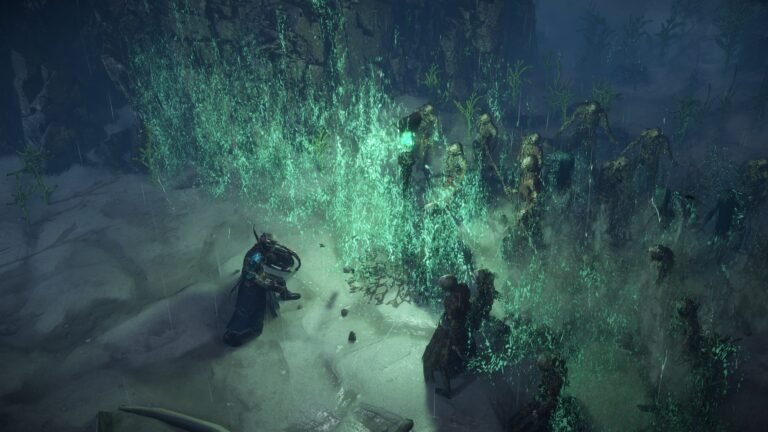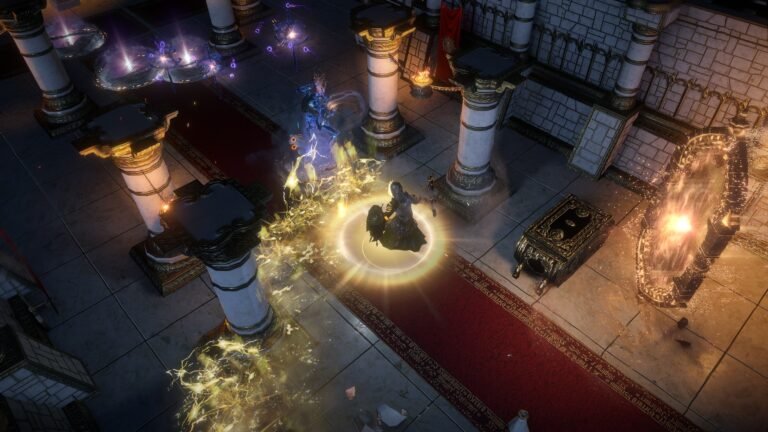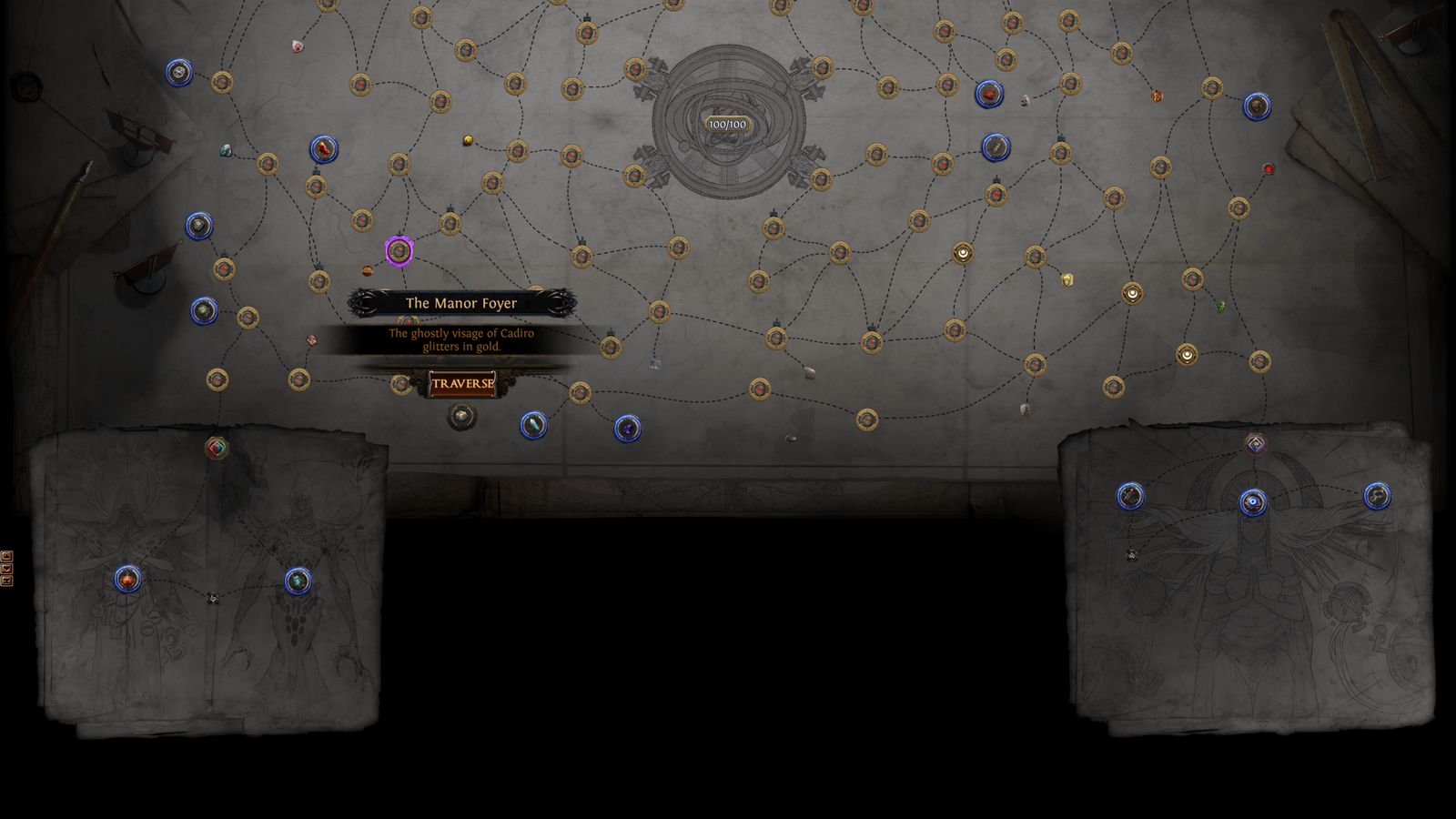
Path of Exile — Curse of the Allflame (3.29, 2026): trecho do Atlas com The Manor Foyer selecionada e a opção Traverse, exemplificando uma localização especial. Captura oficial de divulgação: Grinding Gear Games.
You defeated Kitava in Act 10 and reached the Epilogue. During the campaign, you followed fairly linear quests. Now Commander Kirac introduces the Atlas of Worlds: connected locations, tiers, bonuses and routes to advanced encounters. You open your first map and defeat its boss—but how do you reach the rest of the Atlas?
The key is the 3.28 — Mirage overhaul: ordinary Map Items are now generic by tier, and you select the location directly on the Atlas. 3.29 — Curse of the Allflame keeps that system and adds Atlas Anomalies. You no longer need an item bearing the exact name of the next conventional location.
This guide explains how to open maps, reveal connections, distinguish completion from bonuses, sustain Map Items and progress to Tier 16. It then introduces Voidstones and other advanced systems without expecting you to learn everything at once. Updated October 23, 2026. Reference: Path of Exile 1, patch series 3.29; the latest numbered patch identified for this review was 3.29.3b. Newer comment dates do not constitute new patches. Check the official patch index. This covers conventional progression, with separate caveats for Ruthless, not PoE 2.
Nesta matéria
What Is the Atlas of Worlds?
The Atlas of Worlds organizes endgame locations and their connections. Part of the structure begins hidden; completing locations reveals new routes. You can revisit unlocked areas or branch into other paths, while special content follows its own access rules.
| System | Purpose |
|---|---|
| Atlas of Worlds | Shows locations, connections and progression |
| Map Device | Opens portals to the selected area |
| Map Item | Consumable resource for conventional maps |
| Atlas Passive Skill Tree | Changes characteristics and rewards of map content |
The Atlas tells you where to go, the Map Item supplies the resource, the device grants access, and the Atlas tree customizes activities. It does not equip your character or replace your character’s passive tree.
You do not have to finish everything before farming. The catalog of farming methods lists repeatable activities; developing the Atlas gives you more ways to specialize. Choose something suitable for your build and resources.
What Changed in the 3.28 Overhaul?
Before 3.28, ordinary Map Items were tied to specific areas. For example, running Mesa required the item named Mesa Map. Mirage changed that relationship.
How does it work now? Suppose you find a Tier 10 Map Item. It does not need to say Mesa. Open the Atlas, select Mesa if it is available, then use an item that meets its minimum tier. The game opens that selected area.
Why does it matter? You can choose among several unlocked locations without finding a separately named Map Item for each. You still need the consumable and must respect location requirements, but the old name-to-item matching is gone.
Other major changes in 3.28:
- The Atlas was reorganized around a central starting region and four large quadrants.
- Special content was placed directly in the Atlas structure.
- Voidstone effects were redesigned.
- Favoured Maps, the old Kirac Atlas Missions and conventional Scouting Report acquisition were removed.
- The old Map Device crafting options were removed.
- Former Tier 17 maps became Nightmare Maps.
- Arcane Astrolabes, Shaped Regions and Memory Vaults were introduced.
These changes remain fundamental in 3.29. A tutorial made before March 2026 may show a progression system that no longer matches the game. Source: official 3.28 endgame changes.
How to Access the Atlas After the Campaign
The first access comes after Act 10. Our after-campaign guide covers the transition in detail; here is the necessary sequence.
- Finish Act 10, defeat Kitava, and reach the Epilogue in Karui Shores.
- Follow A Call to Arms in the quest log. Talk to Helena when the objective tells you to.
- Go through the tunnel to the War Room and speak with Commander Kirac.
- Take the introductory Map Item offered by Kirac and check its tier. Conventional progression starts at Tier 1.
- Interact with the Map Device, choose an available starting location and review its requirements.
- Insert a compatible Map Item and choose Activate using the current interface.
- Enter one of the portals, explore and find the boss.
- Defeat the boss to complete the conventional objective. Killing ordinary monsters alone is not enough.
- Return to Kirac and complete the dialogue required by the quest.
- Reopen the Atlas and inspect the new locations and services before selecting another map.
This follows documented quest objectives, not a ZAUS.GG gameplay test. On a character with shared unlocks, follow the step actually shown in your quest log.
Do I need to do this on every character? Atlas progression and some unlocks may be shared among characters in the same league, but each character must still meet relevant access requirements. Never assume different leagues share every unlock.
Is the Map Device available in my hideout? Yes, once the appropriate unlock is obtained, you can open maps from your hideout.
How to Use the Map Device in 3.29

The new device workflow differs from the interface before the overhaul. Interacting with the Map Device opens the Atlas so that you can select an accessible location.
Step by Step
- Interact with the Map Device.
- Check the available locations.
- Select the area you want to explore.
- Read its minimum tier and special requirements.
- Insert a compatible Map Item.
- Check the item’s rarity and modifiers.
- Add Scarabs or other compatible resources, if appropriate.
- Activate the map.
- Enter the portals.
What tier must the Map Item be? It must be equal to or higher than the location’s minimum tier. A location with base tier 6 can be run using a T6 item at T6, or using a T8 item at T8 if that location is available. Spending T8 does not mean running an unchanged T6 area. A T4 item cannot meet a minimum T6 requirement.
Does a higher-tier item increase difficulty? Yes. The chosen item’s tier determines the tier at which an ordinary location runs. A T10 item on a lower-base-tier location does not necessarily retain the area’s original enemy level or difficulty.
Can I repeat a location? Yes, once a conventional location is unlocked, you may run it again with compatible Map Items. The interface also supports convenient repetition of the last location.
What about special maps? Unique Maps, Nightmare Maps and some boss areas can require their own items or access mechanisms. A generic Map Item does not open everything on the Atlas.
Map Items and Map Tiers: Identifying Maps
Conventional Map Items are consumables identified by tier, rarity, modifiers and sometimes corruption. These are the ordinary bands and area levels:
| Tier band | Tiers | Area level |
|---|---|---|
| White | T1–T5 | 68–72 |
| Yellow | T6–T10 | 73–77 |
| Red | T11–T16 | 78–83 |
Tier band is not item rarity. A T3 map belongs to the white tier band but its Map Item may be Normal, Magic or Rare. Tier describes progression; rarity influences possible modifiers and bonus conditions.
Tier is not character level, either. Equally leveled characters may handle different tiers based on gear and skills. Two items of the same tier can be very different: a mod that prevents your build’s recovery may matter more than several seemingly stronger affixes.
Rare items can have more mods than Magic ones, but are not automatically safe or profitable. Read the item before activation.
How to Unlock New Atlas Locations
Progression starts in the Atlas center. Completing locations reveals new regions and connections.
Basic Procedure
- Open the Atlas. Check which locations are available.
- Find an unfinished map. Look at completion indicators.
- Check connections. Find an accessible path toward a new location.
- Read the minimum tier. You need a compatible Map Item.
- Open the map using the Map Device.
- Explore and pursue the relevant objective.
- Defeat the boss. This records completion for most conventional maps.
- Check the Atlas again. Inspect completion indicators and revealed connections.
- Select your next objective. Continue from accessible areas.
Example: you finish a Tier 2 location and reveal a connected Tier 3 area. Obtain a Map Item that satisfies its minimum tier, then continue.
Can I open any Atlas location immediately? No. The location must be available and its requirements met. A high-tier item alone does not unlock the entire Atlas.
Must I follow one fixed route? No. The Atlas branches, although advanced content may have specific prerequisites.
If a location is locked, check unfinished connections, hidden regions, minimum tier, special prerequisites and whether your item matches the destination. Generic items remove name matching, not progression gates.
Completing a Map Is Not the Same as Earning Its Bonus
This distinction is essential when developing the Atlas.
Normal Completion
For most conventional maps, defeating the area’s boss records ordinary completion.
Bonus Objective
A Bonus Objective adds requirements, mainly involving the location’s base tier and the Map Item’s rarity. Completing it usually grants an Atlas Passive Point.
Example: you defeat the boss of a base-Tier-7 location using a Normal Map Item. The map may count as completed, but its bonus needs Rare or better. You may need to run it again with a correctly prepared item.
Completion does not automatically include the bonus. Check both Atlas indicators.
Why earn bonuses? They provide Atlas Passive Points and the 3.28 system grants +1% Map Item Quantity per four Bonus Objectives. Four bonuses give +1%; eight give +2%. That is not a guaranteed map every run or a fixed T16 drop rate.
Rarity and Corruption Requirements
| Location’s base tier | Conventional bonus requirement |
|---|---|
| 1–5 | Magic or higher |
| 6–10 | Rare or higher |
| 11–16 | Rare and Corrupted |
You must also complete the actual area objective. Special locations may use different rules.
White maps (T1–T5): a Magic Map Item or better satisfies the rarity condition; Normal generally does not.
Yellow maps (T6–T10): use Rare or higher. Magic is insufficient.
Red maps (T11–T16): you need an item that is both Rare and Corrupted.
How do I prepare rarity? An Orb of Transmutation upgrades a Normal item to Magic; an Orb of Alchemy upgrades Normal to Rare; a Vaal Orb corrupts eligible items. Corruption can produce unpredictable changes, so do not use Vaal Orbs blindly.
Can a higher-tier item earn a lower-tier bonus? Yes, if the location is accessible and the item qualifies. A T7 Magic Map Item can satisfy the bonus rarity condition for a base-T4 location, but not a base-T7 location, which requires Rare. Bonus rarity depends on the location’s base-tier band, while the item must meet its minimum access tier.
Finding Missing Bonuses
Patch 3.28.0e introduced a useful Atlas highlight: with a Map Item selected or hovered, the interface can indicate locations that still need their Bonus Objective and can earn it using that item.
- Open the Atlas while keeping your inventory accessible.
- Hover or select a Map Item as appropriate for the interface.
- Inspect highlighted locations.
- Pick an accessible one and verify its other requirements.
- Run the map and finish the objective.
In GGG’s example, a T7 Magic item highlights some lower-tier bonuses that require Magic, but it does not qualify automatically for base-T6 or T7 bonuses that require Rare. Highlighting does not bypass location unlocks. Source: official 3.28.0e patch notes.
Atlas Passive Points: What Are Bonuses For?
Atlas Passive Points belong to the Atlas Passive Skill Tree, separate from your character’s passive tree. They modify map activities and their rewards rather than equipping or leveling your build.
Depending on your choices, the Atlas tree can influence the frequency of mechanics, monster characteristics, reward quantity and types, Map Item drops, special systems and other endgame conditions.
Where do points come from? Conventional map Bonus Objectives, eligible Unique Map completions, different Nightmare Map completions and specific endgame quests or encounters.
Does every completed map grant a point? No. Meet its relevant bonus or special objective.
How do I check progress? Open the Atlas tree and examine available points; /atlaspassives can also help report corresponding completion progress.
Can I spend these points on my character? No; the trees are independent.
What’s the best beginner Atlas tree? It depends on your goals. Prioritize needs you can currently use rather than assuming there is one universal setup. For current nodes, see the official Atlas tree and verify the appropriate PoE 1 mode.
How to Get More Map Items
Map Items may drop from monsters, bosses and activity rewards, appear in Kirac’s store, or be traded when the league permits. The tier of drops depends on activity conditions; defeating a boss does not guarantee a higher-tier item.
If your supply runs low, repeat accessible maps, earn experience and establish a reserve. Because items are generic within their tier, you need not run only the location whose bonus is still missing.
In trade leagues, compare buying with other options. Availability and prices change with the economy; our trade, Faustus and economy guide discusses trading mechanics.
Commander Kirac: How His Shop Works Now
Kirac remains important, but his functions changed with the overhaul. He introduces the Atlas, sells map-related items and participates in certain special encounters.
Can I buy Map Items with Gold? Yes. Since 3.28, much of Kirac’s conventional Map Item selection uses Gold. Some special items can require other currencies such as Chaos Orbs or Orbs of Chance.
Can I refresh his stock? Yes, by paying Gold. To use the shop:
- Talk to Kirac and view his inventory.
- Compare the available tiers with the locations you can enter.
- Check the displayed price; ordinary Map Items typically use Gold while special items may have another cost.
- Buy an item that resolves a real need, such as reaching a connected location or earning a missing bonus.
- If the selection is unhelpful, consider refreshing it for Gold and read the price first. There is no universal fixed refresh cost in this guide.
- Return to the Map Device and use the purchased item at an unlocked, compatible location. Buying an item does not unlock a blocked location or award its bonus.
Do old Kirac Missions still exist? No, not in their pre-3.28 form. GGG removed his old Atlas Missions and conventional Scouting Report acquisition.
Is Kirac obsolete? No. His shop and special functions remain useful. Older advice to stockpile Scouting Reports or use Kirac Missions is outdated.
The old Map Device crafting options were also removed in 3.28. Do not confuse those options with inserting compatible Scarabs and fragments. See the official 3.28 endgame notes.
Map Sustain: How Not to Run Out of Maps
Map sustain means obtaining enough Map Items to continue playing, not receiving a higher-tier map on every run.
A Simple Beginner Routine
- Organize Map Items by tier and see what is available.
- Open the Atlas and identify accessible locations.
- Look for missing bonuses, which may be worth completing.
- Choose a compatible location, considering tier and character strength.
- Run the map and complete its objective when possible.
- Review your drops: is the reserve growing or shrinking?
- Check Kirac’s shop if you lack a particular tier.
- Use other sources if needed, including trade in eligible leagues.
Should I save every low-tier item? Not necessarily. They can help with missing bonuses or repeatable activities, but saving every copy is not a universal strategy.
What if I have too many of one tier? Use them on different accessible locations whose minimum tier they satisfy.
What if drops are scarce? Check completion, missing bonuses, alternative sources and whether your Loot Filter is hiding items you want.
Is sustain guaranteed? No. Neither a replacement map nor an equal/higher-tier drop is guaranteed every run. A reserve plus Atlas development is more reliable than depending on a single attempt.
Progressing from White Maps to Tier 16
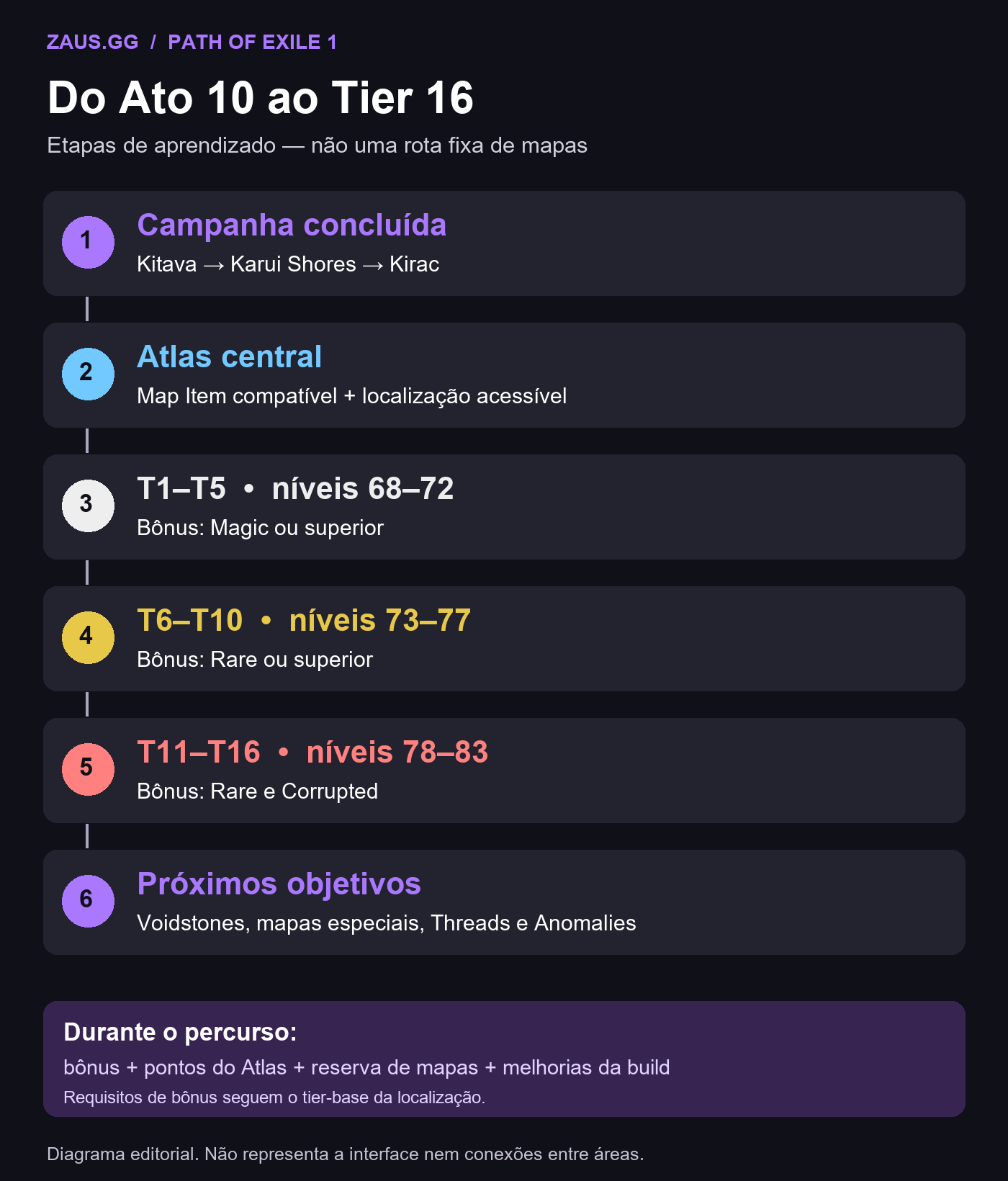
T1–T5: First Routes and Bonuses
Start around the Atlas center, choose unfinished accessible locations and use compatible Map Items. For a bonus on a base-T1–T5 location, prepare at least Magic. After the boss, check the completion marker, bonus and newly revealed connections.
You do not have to complete every white location before entering T6. You can pursue a new route, finish a missing bonus or repeat maps to build a reserve. Advance when access requirements and your character allow it.
If your build struggles, check resistances, Life or Energy Shield, recovery, supports, equipment and flasks. Our skill gems, supports and links guide and Path of Building tutorial help diagnose problems before spending currency.
T6–T10: Develop Connections and Your Build
Yellow-band bonuses require Rare or better. Prepare the item, read its modifiers and only then activate it. Keep unlocking routes, completing bonuses, assigning Atlas points and monitoring your supply.
Higher enemy levels combine with affixes. If a map fails, first check whether the particular modifiers countered your build rather than assuming the whole tier is beyond reach. Another item of the same tier can be much safer—or more dangerous.
T11–T16: Consolidate Conventional Maps
The red band starts at T11 and ends at T16, the highest conventional tier. Progress along accessible connections; there is no universally fixed sequence of named areas.
| Stage | Main goal |
|---|---|
| T1–T5 | Learn mapping and acquire early bonuses |
| T6–T10 | Develop Atlas connections and passives |
| T11–T15 | Advance through red maps and fix weaknesses |
| T16 | Consolidate ordinary maps and choose advanced goals |
For bonuses on red-base-tier locations, use Rare and Corrupted. You don’t need to Vaal every map you only intend to run. After corruption, reread the resulting mods: the item might become unsuitable for your build.
Reaching T16 does not complete the Atlas or prove you can defeat any boss. Unique Maps, Voidstones, Nightmare Maps, Threads, altered regions and bonuses may remain. Choose a specific next objective rather than trying everything at once.
The Atlas’s Four Quadrants
The redesigned Atlas starts in the center and has four large quadrants. Each has routes toward advanced content and a Voidstone position.
| Quadrant | Associated content |
|---|---|
| Upper left | Memory Threads and Incarnations |
| Upper right | The Shaper, The Elder and related encounters |
| Lower left | The Searing Exarch and The Eater of Worlds |
| Lower right | The Maven and other encounters |
These are orientation references, not a list of every map or a mandatory route. There is no universally best quadrant and no requirement to complete one before exploring another.
Quadrants also matter for Voidstone regional effects and the relationship between Shaped Regions and Memory Vaults. Ordinary map distribution can change between patches, so a 3.28 screenshot is not definitive evidence of every 3.29 location.
Voidstones: How They Work After the Overhaul
Voidstones are advanced Atlas progression items. Patch 3.28 changed both their effects and how they are obtained.
What does a socketed Voidstone do?
- Raises the minimum map tier in its own quadrant to 16.
- Makes affected Map Item drops in that quadrant drop one tier higher.
- Converts affected Map Item drops of Tier 15 or below into Gold; it does not convert items already in your inventory or stash.
- Provides its own global Atlas benefit.
- Contributes to unlocking the possibility of Nightmare Map drops.
Does one Voidstone change every quadrant’s tier? No. The minimum-tier effect belongs to its corresponding quadrant, although each stone has a particular global bonus.
| Voidstone | Acquisition requirement |
|---|---|
| Ceremonial Voidstone | Defeat The Maven |
| Decayed Voidstone | Defeat The Shaper and The Elder; Uber Elder may also satisfy the relevant condition |
| Eldritch Voidstone | Defeat The Searing Exarch and The Eater of Worlds |
| Originator Voidstone | Defeat The Incarnation of Dread |
These are the post-3.28 requirements. Previously, Exarch and Eater supplied separate Voidstones; now their encounters contribute to one. Originator is associated with Incarnation of Dread, and Decayed also received revised acquisition conditions.
For example, inserting the stone in Maven’s quadrant makes its conventional locations require T16; it does not automatically raise the other three quadrants. A stone’s global benefit is distinct from that regional tier effect.
You do not need to defeat all four bosses immediately. Develop the Atlas and your character, then choose an advanced encounter you’re prepared to access.
Unique Maps: Locations with Their Own Rules
Unique Maps have particular layouts, bosses, rewards and goals. They appear in the Atlas directly since 3.28, but not all can be opened by generic Map Items. Obtain their appropriate items or follow a special access mechanism.
Each different eligible Unique Map completed grants one Atlas Passive Point, up to ten points from this system. GGG listed around twenty possibilities during the overhaul, so you do not need them all. Repeating the same Unique Map does not grant an extra point.
Read each area’s objective. Do not automatically apply the Magic/Rare/Corrupted table for conventional bonuses: this is a separate system. Patch 3.28.0e removed the Bonus Objective line from Unique Map advanced descriptions to reduce confusion.
Untainted Paradise changed in 3.29: its Unique Map item stopped dropping, and older copies cannot be used in Standard. Access now comes from a random Atlas event, with updated difficulty and rewards. Do not follow obsolete item-based entry instructions.
Nightmare Maps: What Happened to the Old Tier 17?
In 3.28, former T17 content became Nightmare Maps, special maps with their own modifiers, access and encounters. They are not generic Tier 17 items for any location and are not a mandatory immediate step after the campaign.
Voidstones enable a chance for Nightmare Map drops from qualifying T16 Map Items. That does not guarantee one per run and does not convert stored T16 items automatically. Check the special item and destination requirements before entry.
The first completion of each different Nightmare Map awards one Atlas Passive Point, with up to five from this system. Repeating one does not grant another. Many profitable or useful farming activities can be played without completing all five.
Astrolabes and Shaped Regions
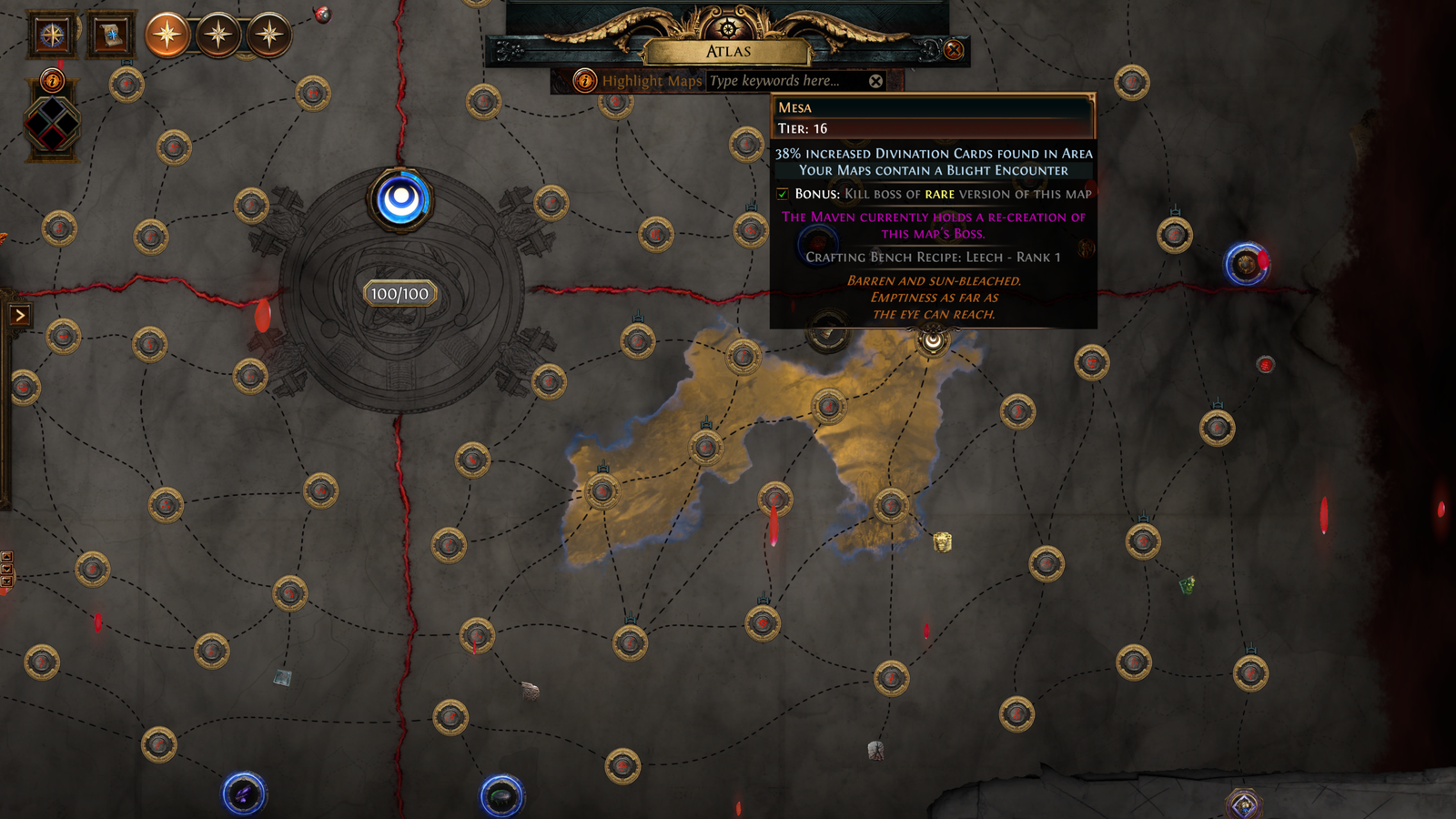
Patch 3.28 introduced Arcane Astrolabes as part of the endgame overhaul. They can manifest a modified region in one Atlas quadrant.
What is an Astrolabe? An item that applies a special influence to a compatible Atlas location.
What is a Shaped Region? An altered region affecting several maps with additional conditions.
How does it work? In simplified order:
- Obtain an Astrolabe.
- Find a suitable location.
- Apply the item.
- A Shaped Region appears in the quadrant.
- Several locations gain special effects.
- Complete the required objectives.
- Finish the Astrolabe-added content to remove its influence from that location. Killing only the normal boss may not be enough if special content remains.
- The other locations in the region gain an additional modifier, increasing the conditions of later runs.
- Repeat across the remaining locations, reading accumulated modifiers before each map.
- Once the whole Shaped Region is cleared, follow Eagon to that quadrant’s associated Memory Vault.
Are all Astrolabes identical? No; they have different types and application requirements.
What changed in 3.29? Enshrouded Astrolabe was renamed Deceptive Astrolabe, an example of why names and instructions need patch-specific checks.
Should beginners spend them immediately? No. Understand requirements and consequences before investing advanced resources.
Memory Vaults vs. Memory Threads: What’s the Difference?
These are separate advanced systems connected to the 3.28 changes.
Memory Vaults
Memory Vaults follow completion of Shaped Regions. There are four, associated with the Atlas quadrants, and each offers rewards under its own rules.
Memory Threads
Memory Threads are special sequences of maps and encounters tied to advanced Atlas story progression.
Routes introduced by 3.28 include Memory of Loneliness (Incarnation of Neglect), Memory of Trauma (Incarnation of Fear) and Memory of Reverence (Incarnation of Dread). The Threads of the Originator quest grants a book with two Atlas Passive Skill Points and two Atlas refund points per Incarnation defeated, according to the 3.28 overhaul. Those are Atlas points, not character passive points. Fulfill quest requirements and use the awarded book.
Is a Memory Vault a Nightmare Map? No.
| Content | General purpose |
|---|---|
| Conventional map | Regular Atlas exploration and progression |
| Shaped Region | Region modified by an Astrolabe |
| Memory Vault | Special content unlocked after clearing a Shaped Region |
| Memory Thread | Special encounter/progression sequence |
| Nightmare Map | Advanced map with its own mechanics |
You do not need to master any of these before T16. First learn to unlock locations and earn bonuses.
Atlas Anomalies: New Locations in 3.29
Atlas Anomalies are special locations added in Curse of the Allflame. After you complete maps affected by a Voidstone, an Anomaly may manifest when you reopen the Atlas. This guide does not assume an appearance percentage.
When an Anomaly appears, select it and use the indicated access. It requires no Map Item, is not affected by the Atlas Passive Skill Tree and cannot be enhanced with Fragments. Do not treat it like an ordinary map to combine with Scarabs.
Reflecting Mists and The Nameless Seer stopped appearing randomly inside conventional maps and received their own Anomaly areas. Since appearance depends on Voidstone-affected maps, this is an objective for later progression, not your first Atlas session. Source: official 3.29 Endgame Changes.
Maps and Modifiers: Why Can One Tier Be Harder Than Another?
Two maps of the same tier can be very different because Map Items have modifiers that alter area conditions. They may affect monster damage and life, resistances, recovery, ailments, speed or other combat effects.
Should I read all mods? Focus especially on those that undermine your build. If you rely on a certain recovery method, an affix that interferes with it can be particularly dangerous.
What changed about Reflect? Patch 3.29 redesigned older reflection modifiers. Under certain conditions, rare monsters now use mechanics called Physical Thorns and Elemental Thorns. The danger has changed, not disappeared.
What if a modifier counters me? Consider rerolling or replacing the item before use. You are not required to run every combination.
Does Rare guarantee better results? No. More modifiers and bonus eligibility do not guarantee safety or profit. For build-dependent threats, read our resistances and defenses guide. A separate guide will cover detailed map and Scarab preparation.
How to Spot Outdated Atlas Tutorials
The 2026 overhaul invalidated many old instructions, although older guides can still contain useful general concepts.
| If the tutorial says… | Check the current system |
|---|---|
| Find a Map Item bearing the exact location name | Conventional items are generic by tier since 3.28 |
| The Map Device only opens the old map interface | It opens the Atlas for location selection |
| Save Kirac Missions | The old system was removed |
| Refresh those missions with Scouting Reports | No longer works in the current structure |
| Every map needs newly obtained ordinary Cartographer’s Chisels | Ordinary Chisels stopped dropping in 3.28 |
| Use the old Map Device crafting options | Those options were removed |
| Unlock Favoured Maps | That system was removed |
| Generic Tier 17 follows T16 | That content became Nightmare Maps |
| All four Voidstones work exactly as before | Their effects and sources changed |
| Reflecting Mists randomly spawn in ordinary maps | 3.29 moved them to Atlas Anomalies |
| The Atlas layout matches 2025 | 3.28 reorganized its structure |
Existing ordinary Cartographer’s Chisels still work according to 3.28 notes; that does not mean they continue to be obtained conventionally. Map distribution also changed in 3.29, so 3.28 images illustrate the general reform without proving all locations still match.
Practical Example: From Your First Map to Tier 16
Consider a hypothetical player who just completed the campaign with a build suitable for early maps. This is an instructional example, not gameplay tested by ZAUS.GG. Our first build guide helps set expectations for damage, defenses and investment.
- After Kitava: reach Karui Shores, follow A Call to Arms and meet Kirac.
- First Map Item: receive a T1 item during the introduction.
- First location: open the device and choose an available Atlas location.
- First map: use the item, enter the portals and defeat the boss.
- Check completion: inspect whether both completion and the bonus registered.
- Reveal connections: find the newly available location and its tier.
- First bonuses: use Magic items for base-T1–T5 bonuses when needed.
- Build the Atlas tree: earn and assign initial Atlas Passive Points.
- Sort items: save and organize Map Items by tier.
- Advance through white maps: explore accessible paths.
- Reach T6: obtain a compatible item for a yellow location.
- Prepare the bonus: use Rare when pursuing its Bonus Objective.
- Strengthen the character: examine resistances, recovery, gems and gear rather than rebuilding without diagnosis.
- Reach T10: continue earning completions and Atlas points.
- First red map: unlock a T11 location and read its mods.
- Learn corruption: prepare Rare + Corrupted items for red bonuses.
- Continue: reveal connections, repeat maps for supplies and consult Kirac when useful.
- Reach T16: successfully run a conventional T16 location.
- Review pending goals: locate unfinished bonuses.
- Identify advanced paths: Unique Maps, Voidstones, Nightmare Maps, Astrolabes, Threads and boss encounters.
- Choose the next objective: develop the Atlas tree and prepare for bosses without attempting every system simultaneously.
What did this teach? Progress was about connections, compatible items and bonus requirements—not memorizing exact map names. Improving the build as difficulty increased made that progression sustainable.
Common Atlas Progression Problems
| Problem | Possible cause | What to do |
|---|---|---|
| I can’t open the location | Tier too low or prerequisite missing | Check minimum tier and unlock |
| My Map Item has no area name | 3.28 overhaul | Select the location in the Atlas |
| No new connections appear | Objective not completed | Check boss and completion |
| I killed monsters but didn’t complete the map | Boss or objective remains | Check the specific requirement |
| I didn’t earn the bonus | Wrong rarity or corruption | Review base-tier bonus rules |
| I have duplicate maps | Generic Map Items | Use them at other compatible locations |
| I ran out of Map Items | Insufficient reserve | Check Kirac, drops and other sources |
| I can’t find Kirac Missions | System removed | Use Kirac’s current shop |
| I can’t find Favoured Maps | System removed | Select locations directly |
| My build dies in yellow maps | Insufficient defenses or dangerous mods | Review build and map |
| I fail red maps | High difficulty or unfavorable mods | Fix weaknesses and prepare items |
| Unique Map rejects a generic item | Special entry requirement | Check its own access item |
| Nightmare Map won’t open as ordinary map | Special content | Check its requirements |
| My Voidstone doesn’t change the whole Atlas | Quadrant-specific effect | Check placement and description |
| No Atlas Anomalies appear | Spawn prerequisites not met | Review Voidstone-affected maps |
| My guide shows another Atlas | Pre-overhaul information | Use 3.28–3.29 documentation |
Before rebuilding your character or spending a lot of currency, identify which particular requirement is blocking your progress.
Complete Atlas Progression Checklist
Initial Access
- ☐ Finished the campaign.
- ☐ Met Commander Kirac.
- ☐ Understood A Call to Arms.
- ☐ Know how to reach the Map Device.
- ☐ Can open the Atlas.
- ☐ Can use a Map Item.
First Maps
- ☐ Completed my first map.
- ☐ Understand that defeating the boss usually records completion.
- ☐ Know how to check Bonus Objectives.
- ☐ Know the white-map bonus requirements.
- ☐ Can identify newly connected locations.
- ☐ Started developing the Atlas passive tree.
Intermediate Progression
- ☐ Can identify a location’s minimum tier.
- ☐ Understand conventional Map Items are generic by tier.
- ☐ Can choose among unlocked locations.
- ☐ Know when a higher-tier Map Item is usable.
- ☐ Know the yellow-map bonus requirements.
- ☐ Can use Kirac’s current shop.
- ☐ Can maintain a Map Item reserve.
- ☐ Can use Atlas highlighting to find pending bonuses.
Red Maps
- ☐ Can access T11+ locations.
- ☐ Know the Rare + Corrupted bonus rule.
- ☐ Read modifiers before activation.
- ☐ Recognize when my build needs improvements.
- ☐ Can progress toward T16.
Advanced Endgame
- ☐ Understand the four quadrants.
- ☐ Know what Voidstones do and where all four come from.
- ☐ Distinguish Unique Maps from ordinary maps.
- ☐ Understand Nightmare Maps.
- ☐ Recognize Astrolabes and Shaped Regions.
- ☐ Know what Memory Vaults and Memory Threads are.
- ☐ Recognize Atlas Anomalies.
- ☐ Understand that reaching T16 is not the end of all endgame content.
This checklist is about what you understand and which goals you want to pursue. You do not need to finish every advanced activity before beginning to farm.
The Atlas Connects the Campaign to Your Next Goals
Today’s Atlas lets you choose locations using generic Map Items by tier, but still requires unlocked paths, compatible items and completed objectives. Separating normal completion from Bonus Objectives helps you use resources intelligently: one run may reveal connections, while another—prepared with the right rarity—can award a pending bonus.
At Tier 16, you have consolidated conventional mapping but can keep developing Voidstones, special maps, Memory Threads, Shaped Regions and Anomalies. You do not need to master every system simultaneously or complete them all before choosing a repeatable activity.
Check the next available route, your Map Item reserve and your build’s readiness. Your next step need not be the hardest or most profitable one—only the one that moves you toward a goal you’re prepared to tackle.
Image credits: Grinding Gear Games, official Curse of the Allflame (3.29) and Mirage (3.28) press kits, as credited with each image. Original diagram: ZAUS.GG. Mirage screenshots show the overhaul, not necessarily every 3.29 location. Click images to enlarge in the original article.
About the Author