PoE (2024): Faustus em Kingsmarch. Captura oficial histórica: GGG.
You finish a map and find three Rare items: one with six affixes, another with four, and a Fractured base whose other stats seem poor. Which is worth more? Affix count cannot answer that. The third item might be a desirable crafting base, while the first item’s six affixes might not work together for any build.
Pricing items in Path of Exile means understanding who could use an item and what alternatives that buyer has. This guide turns that analysis into market research and a selling decision without relying on a price list that goes stale every league.
Revised October 27, 2026 for Path of Exile 1, version 3.29 — Curse of the Allflame, with official patch information checked through 3.29.3b. The educational numbers below are hypothetical: they are neither live market quotes nor sales made by ZAUS.GG. PoE 2 has separate economies.
Nesta matéria
Value, supply, and liquidity: what listings really tell you
Use value is the benefit an item provides to a character; market value depends on buyer interest and available alternatives. A ring with Chaos Resistance might fix your defenses but compete with many cheap equivalents. A Fractured base you would never equip might be attractive to someone crafting gear.
Supply, popular builds, balance changes, crafting availability, and league timing all influence the relationship. Early in a league, players need progression gear; later, specialized equipment may receive more attention. That does not mean every item necessarily gets cheaper with time: some combinations become more popular or harder to find.
Choose the correct economy. Curse of the Allflame, Standard, Hardcore, and private leagues do not necessarily share prices. SSF disallows ordinary player trading; external prices can offer context, not an available SSF sale.
| Hypothetical listing | Asking price |
|---|---|
| A | 20 Chaos Orbs |
| B | 25 Chaos Orbs |
| C | 40 Chaos Orbs |
| D | 5 Divine Orbs |
These illustrative listings do not establish a market rate. D might be a superior item or an asking price without a buyer; A could reflect a quick sale, an error, a different item, or a stale listing. Without checking the currency exchange rate in the same economy, do not casually rank Chaos and Divine as though they were interchangeable units.
A listing is an asking price, not a confirmed transaction. Compare multiple functionally similar items. Listing count shows competition but does not, by itself, measure demand.
Liquidity describes how easily you can find a buyer. An expensive item that fits very few builds can take time to sell. A competitive price suits a quick-sale strategy; asking for more involves accepting more waiting and uncertainty. Your currency needs and available time determine the trade-off.
Inspect the item before opening a search
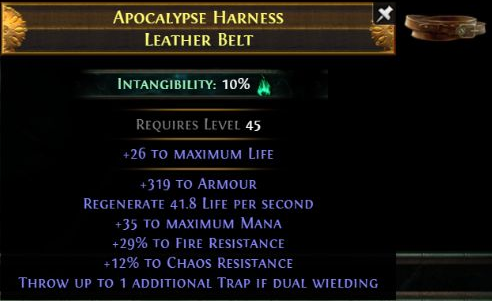
In the screenshot, Apocalypse Harness is the Rare name and Leather Belt is the base. The separate +26 Life line is the implicit; Requires Level 45 is an equipment requirement. The promotional image does not show item level or advanced modifier tiers, so it cannot establish T1 or reliably count open affix slots.
On PC, hover over the item and hold Alt using the default controls; enable Advanced Mod Descriptions in the options if needed. Check category, Base Type, rarity, Item Level, required level, implicit, prefixes, suffixes, tiers, rolls, Quality, sockets, links, and special states. Item Level is not the character level required to equip the item.
A Rare’s randomized name does not identify a fixed set of modifiers. Search its properties and, when relevant, the base. A Unique’s exact name is a useful starting point, but its variant still matters. Our equipment, bases, and modifiers guide explains how to read these details.
A tier is a modifier’s range; a roll is the value within that range. Hypothetical resistance rolls of +31% and +35% might belong to the same tier. The difference could matter greatly to a character reaching a threshold and very little to another buyer. A Divine Orb rerolls eligible numerical values; it does not guarantee improvement or automatically upgrade the tier.
Open affix slots matter too. A Rare with useful stats and a free prefix may allow a helpful finishing craft. An item filled with unrelated affixes may be less desirable. Check the available affix group and Mod Groups: an open slot does not mean you can add any modifier you want.
For attack weapons, compare physical/elemental damage, speed, critical chance, implicit, and relevant affixes. Use the final damage figures displayed on the weapon rather than applying local modifiers a second time:
pDPS = (minimum physical damage + maximum physical damage) ÷ 2 × attacks per second.
For a hypothetical 200–400 physical damage weapon with 1.50 attacks per second, the average is 300 and 300 × 1.50 = 450 pDPS. eDPS uses the sum of relevant average elemental damage values multiplied by attack speed. Neither equals final build DPS: skill mechanics, conversion, critical hits, and other interactions still matter.
A spell Wand may be valued for Spell Damage, Cast Speed, gem levels, spell critical modifiers, or specific multipliers. Its pDPS may be nearly irrelevant to the buyer. Do not judge every weapon by the biggest damage figure on its tooltip.
| Category | Properties to compare according to the build |
|---|---|
| Body Armour | Defensive base, Life, resistances, links, and special affixes |
| Boots | Movement Speed, Life, resistances, Suppression, and eligible defenses |
| Gloves | Attack Speed, Life, resistances, Suppression, and implicits |
| Helmet | Defenses, gem levels/supports, reservation, and specific effects |
| Rings | Implicit, Life, Mana, resistances, attributes, and relevant damage |
| Amulets | Gem levels, attributes, multipliers, implicit, and Anointment when allowed |
| Belts | Life, resistances, flask properties, and the purpose of the base |
This table suggests search filters; it does not mean every item must have every property. For a Stygian Vise, consider the Abyss Jewel that fits its socket and check whether the jewel is actually included in the offer. In 3.29, Moonstone Ring has an implicit of 7–10% increased Cast Speed; historical Energy Shield versions need separate comparisons.
Rare, Unique, and special states: find the right comparables
A progression Rare with Life, resistances, and Movement Speed may serve many characters. Boots with a specialized offensive effect may suit fewer players but remain valuable to those builds. Look for synergy among affixes, not a high affix count.
For a Unique, search by its exact name and compare variant, important rolls, Quality, sockets, links, Enchantments, Corrupted Implicits, and history. A perfect roll is a favorable numerical limit, not a guaranteed price premium. Double Corrupted items may carry valuable effects or useless combinations. Legacy versions should not automatically be compared with current copies sharing the same name.
For Fractured items, filter base, ilvl, the locked affix, tier, and roll. Boots with Fractured Suppression can be valuable as a base despite poor remaining affixes; an irrelevant fracture does not become valuable merely because it is fractured. For Influenced items, identify Shaper, Elder, Crusader, Hunter, Redeemer, or Warlord and their present or potential exclusive affixes. Dual Influence and Elevated affixes can distinguish a piece without implying any fixed added price.
For Eldritch equipment, compare Exarch/Eater implicits, their strengths, Dominance, and explicit affixes. Also assess how easily the combination could be made again. Craft of Exile can estimate crafting attempts and costs using the base, ilvl, and method. That estimate neither measures liquidity nor proves selling price; buyers compare alternatives and are not obliged to refund your crafting costs.
Version 3.29 removed normal acquisition of non-Unique Synthesised items, with the documented exception of corrupting Synthesis Uniques into Rares, and removed Harvest Synthesis. Historical Standard bases need separate origin and restriction checks. Current Talismans use Enchantments, are not Corrupted by default, and cannot receive Anointments. Identify Vestigial and Foulborn variants before searching too: they can play different roles from ordinary Uniques.
The official 3.29 patch notes document these changes. Unusual variants do not automatically imply demand.
Jewels, gems, flasks, and stackable resources
Cobalt, Crimson, and Viridian Jewels need useful affix combinations for the same character. Searching, Murderous, Hypnotic, and Ghastly Eye Jewels have their own modifier pools: compare the intended buyer and any conditional effects. For Unique Jewels, check name, variant, rolls, and requirements. With Forbidden Flame/Flesh, the granted effect and compatible counterpart determine the product; searching only a generic name mixes different items.
For Cluster Jewels, identify Small, Medium, or Large; number of added passives; Enchantment; Notables; ilvl; and other affixes. Two Large Jewels of the same family might fit different trees. Fewer passives can benefit one setup, while another uses small-passive effects; there is no universal rule without looking at the build. Searching only “Large Cluster Jewel” produces weak comparables.
For gems, compare exact name, Level, Quality, Transfigured or Exceptional variant, and Corrupted state. Patch 3.28 introduced new Exceptional Support Gems and removed normal access to many Awakened gems, with exceptions; 3.29 expanded special supports and brought seasonal Pact Skill Gems. Check the current catalogue instead of assuming an old Awakened list describes the whole market. Not every Exceptional gem is expensive, and Quality affects different gems differently.
For Flasks, inspect base, prefix, suffix, Quality, duration, Charges, effect, and synergy, adding rolls and variants for Uniques. For Divination Cards, check reward, cards needed per set, unit price, bulk price, and liquidity. A completed set need not equal the sum of the lowest-priced single cards.
Scarabs, Essences, Fossils, Fragments, and eligible currencies are easier to compare when type and quantity match. Check the trade ratio and any Gold fee. Our currency guide helps distinguish the resources; here the purpose is comparing offers.
Trade Site: the main pricing workflow
Open the official PoE 1 Trade Site. You may need to sign into your game account. Labels can be shown in English or another interface language; read the fields rather than blindly repeating an outdated search.
- Confirm PoE 1, league, and trading mode for the item.
- Under Type Filters, choose the right category and rarity. Include Base Type when the implicit, defense, or crafting eligibility matters.
- Under Stat Filters, start with the buyer’s essential properties. Choose the correct filter origin: Explicit, Implicit, Fractured, Enchant, or Pseudo.
- Set meaningful Min/Max values or ranges. Do not insist on identical numbers if slightly weaker or stronger items serve the same purpose.
- Add important states: Influence, Fractured, Corrupted, Mirrored, or Synthesised. For crafting bases also filter Item Level; for gems use Level, Quality, and variant.
- Check listed price, currency, and availability. Seller availability matters in manual trade; asynchronous offers work differently.
- Run Search, inspect multiple results, and read full tooltips. Sorting by price finds offers but does not establish equivalence.
- Gradually add secondary properties and search again. Compare alternative bases if they satisfy the same need.
- Compare stronger and weaker competing items, number of offers, and likely buyers. Use these results to define a starting price range, not a guaranteed sale.
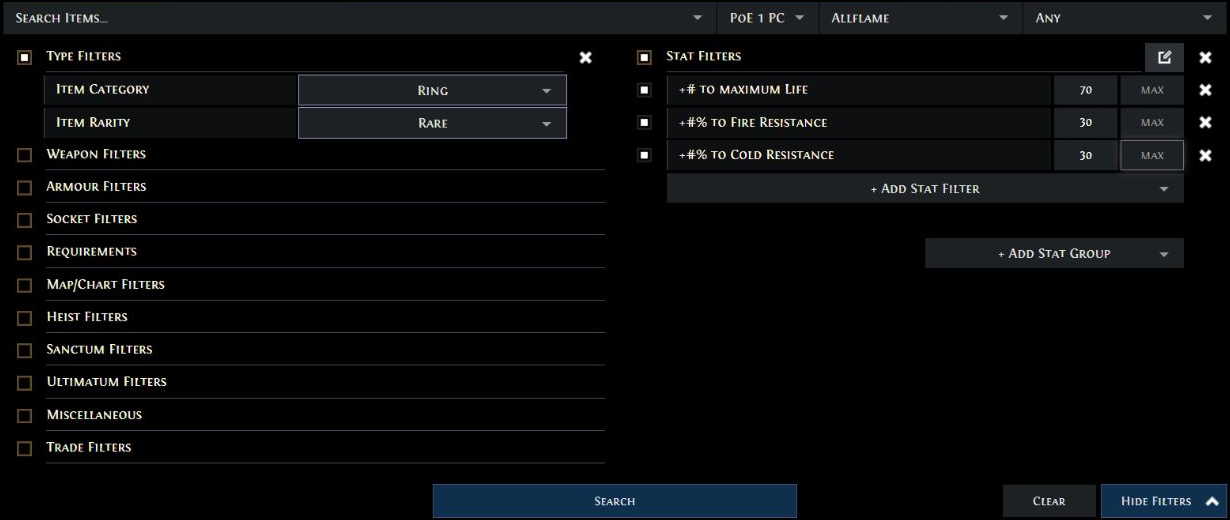
An exact affix filter requires that specific property. Pseudo Stats combine or calculate related attributes: a total resistance figure can come from different distributions. That helps with functional defense comparisons but does not guarantee a particular resistance, affix origin, or crafting slot. If you need fixed Fire Resistance, choose the matching Fractured filter; a Pseudo total cannot prove that state.
Avoid checking every modifier automatically. On a ring with Life, Fire and Cold Resistance, Strength, and Mana, requiring all five might leave very few matches and create a false impression of rarity. Start with what actually affects the buyer’s choice, then test the additional value of the remaining properties.
Patch 3.29.3b fixed Pseudo Mod display in the in-game market results and made Trade Site links encode full searches instead of depending on expiring short IDs. The market fix does not imply a complete redesign of every filter. Share searches generated by the current interface.
Complete example: pricing a Rare ring
Consider a hypothetical ring with +75 Maximum Life, +35% Fire Resistance, +38% Cold Resistance, and +30 Strength. These numbers cannot be assigned tiers without checking base and data. Life is a conventional prefix; both resistances and Strength are suffixes. These three effects already occupy its three conventional suffix slots.
- Identify the base and implicit. Decide whether the buyer needs that base or can use alternatives.
- Read the advanced tooltip and check affixes, ilvl, states, and open slots. Do not assume you can add another conventional suffix without changing the item.
- Use Life and the two resistances for your first comparison; evaluate Strength separately.
- Open Trade Site in the same league, select Rings / Rare, and specify the base only when relevant.
- Apply illustrative filters Life ≥70, Fire Resistance ≥30%, and Cold Resistance ≥30%. These are teaching examples, not universal value thresholds.
- Examine several listings, checking implicit, other affixes, special states, and possible finishing crafts.
- Add a meaningful Strength minimum for the intended buyer, such as around 30 in this example, and rerun the search.
- Watch how listing count and asking prices change. Few matches alone do not prove a high price; there may be little demand for that combination.
- Search more broadly with Pseudo Stats if differently distributed resistances are genuine alternatives for the buyer.
- Compare slightly better and worse items, separating Strength’s effect from any other advantages they offer.
- Set a range based on comparable offers, deciding between a competitive sale and waiting for a specialized buyer.
- List the item through an appropriate method and revisit the price as offers and interest change. Do not invent a final market price for the example ring.
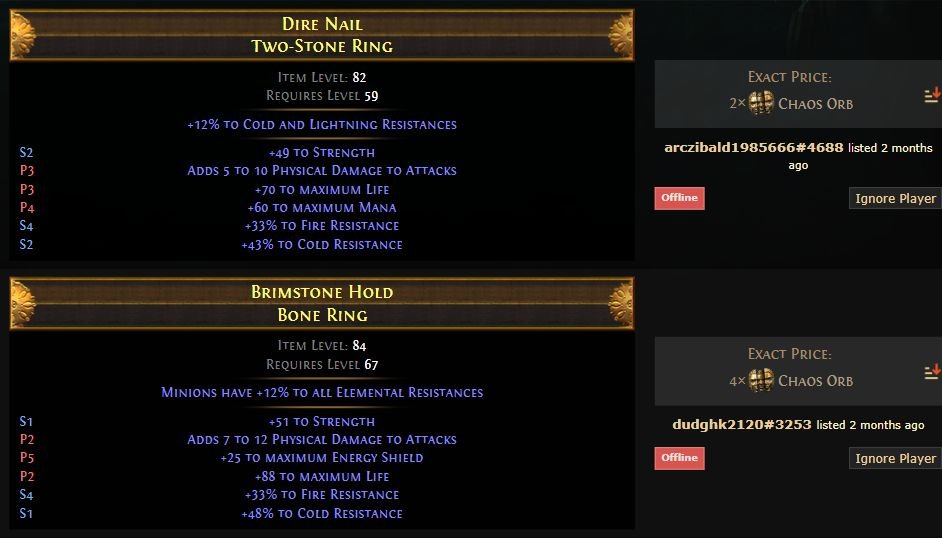
A competitor need not be identical; it needs to solve the same problem. That approach avoids pricing by the Rare’s random name or a single extremely expensive listing.
poe.ninja and Awakened PoE Trade: different reference tools
poe.ninja: select the right economy first
poe.ninja is a community service, not a GGG product. Select PoE 1, visit Economy, choose the league, and open the relevant resource category. Search by exact name, check the displayed reference price, update timing, and trend if available; then compare with the Trade Site or Currency Exchange.
Currencies, Scarabs, Essences, Fossils, Fragments, Uniques, gems, and Jewels may have separate sections depending on coverage. A general Unique reference does not price a copy with a perfect roll or unusual Corrupted Implicit. Neither does it provide dependable prices for arbitrary Rares with random affixes. Sparse offers and poor liquidity increase uncertainty even when a page displays a precise number.
Awakened PoE Trade: inspect Price Check filters
The developer’s website provides the download and Quick Start. At the original article’s revision, the download page showed 3.29.108 and support for Windows 10+, Linux, and macOS. The project documents English and Russian game clients, not a Portuguese game client. It requires Windowed or Windowed Fullscreen, not exclusive Fullscreen; cloud services without clipboard forwarding may be incompatible.
To use it:
- Check the project requirements and download the suitable build from official project pages rather than unknown mirrors.
- Install or run the appropriate package and launch PoE 1 in a supported window mode. The game-client language, not the Trade Site language, is the documented compatibility restriction.
- Open the overlay with Shift + Space, enter settings via the gear icon, and select the correct league.
- Hover over an item in-game and press Ctrl + D, the default Price Check shortcut.
- Check which properties were recognized. Select stats that actually work together for a buyer rather than checking every line by habit.
- Adjust Min/Max ranges. The program may prefill values somewhat below the roll to find alternatives; verify that the range is suitable.
- Compare listings, inspect variants, and open the Trade Site query for deeper research when appropriate.
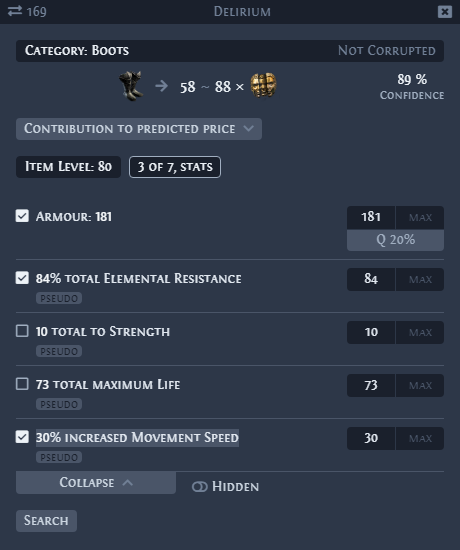
Holding Ctrl keeps the search open while interacting; it can be released once the cursor is in the window. Ctrl + Alt + D opens a search that does not automatically hide when you move the mouse, according to the documentation. Shortcuts can be customized; check your installed version.
The program parses text copied from the in-game item. Some properties are represented as Pseudo Stats, including combined Spell Damage components, which can explain why a particular line is not shown separately. If a gaming environment cannot copy item data to the clipboard, the check may fail. It makes searches faster; it does not magically determine an item’s value.
This is a community application, not a tool individually endorsed by GGG. Use the author’s pages and follow the game’s rules.
Set a range and interpret unusual listings
Gather comparable offers, identify meaningful differences, and choose a starting price that matches your strategy. Many equivalents mean you face competition; very few references call for a less confident range. An item useful to your own build also has opportunity cost: selling means giving up its use.
An offer far below the rest could represent a quick sale, mistake, different item, outdated listing, already-completed sale, or an attempt to influence market perception. Price fixing can involve artificial offers or similar tactics, but a price gap alone is not proof against a particular seller. Inspect items and several listings before drawing conclusions.
A flood of whispers immediately after listing justifies reviewing your item, but does not automatically prove a pricing error. Likewise, no messages may reflect low liquidity rather than an incorrect asking price. There is no universal affix-price formula, and buyers do not owe you the amount you spent crafting.
Selling through Premium tabs, Merchant’s Tab, or Currency Exchange
These three systems have different purposes. For broader economic context, see our trade, Faustus, and economy guide.
| System | Purpose | How the sale happens |
|---|---|---|
| Public Premium Stash Tab | List items for conventional player trading | Buyer contacts you; manual exchange requires interaction |
| Merchant’s Tab | Asynchronous sales of eligible items outside Currency Exchange | Faustus manages the shop; buyers can purchase while seller is offline |
| Currency Exchange | Eligible currencies and stackable resources | Orders match resources offered and requested, with applicable Gold fee |
Premium Stash Tab: listings and manual trades
Open your Stash, select a Premium Stash Tab, and make it public. Place the item in it, set its individual price or applicable tab-wide price setting, and check the currency. Allow for indexing and verify the listing. A regular Stash Tab does not gain these features merely by being renamed as a sales tab.
When a buyer contacts you, confirm the item and agreed price. Organize the exchange, inspect the trade window, and accept only after verifying item, currency, and amount. If an offer changes or the window is reopened, check again. Public listing does not automatically perform a manual trade.
Merchant’s Tab: asynchronous shop and earnings
This system arrived in PoE 1 in 3.27. The official notes place Faustus at Lioneye’s Watch in Act 6 and in the hideout after meeting him in Kingsmarch or that act. In PoE 1 the NPC is Faustus, not Ange from PoE 2.
You need a Merchant’s Tab to list items. You can purchase one or, if eligible, permanently convert a Premium tab purchased before The Third Edict launched. Not every Premium tab qualifies: Premium Quad tabs are ineligible, and tabs obtained through upgrades require checking the account tool’s eligibility information. Conversion permanently changes the tab’s function for the account.
Consult the official conversion tool before changing your storage; conversion is not necessary just to practice researching prices.
The shop workflow is:
- Enter your hideout and talk to Faustus.
- Open Manage Shop and select an available Merchant’s Tab.
- Add an eligible item, outside categories traded through Currency Exchange.
- Select the currency and set a price for that individual item.
- Verify quantity, currency, and desired total; do not carry over Premium pricing assumptions without reading the interface.
- Confirm the listing, checking its status and displayed timer.
- Once sold, return to Manage Shop → Earnings and withdraw the received currency. Earnings is for collection, not for depositing new inventory.
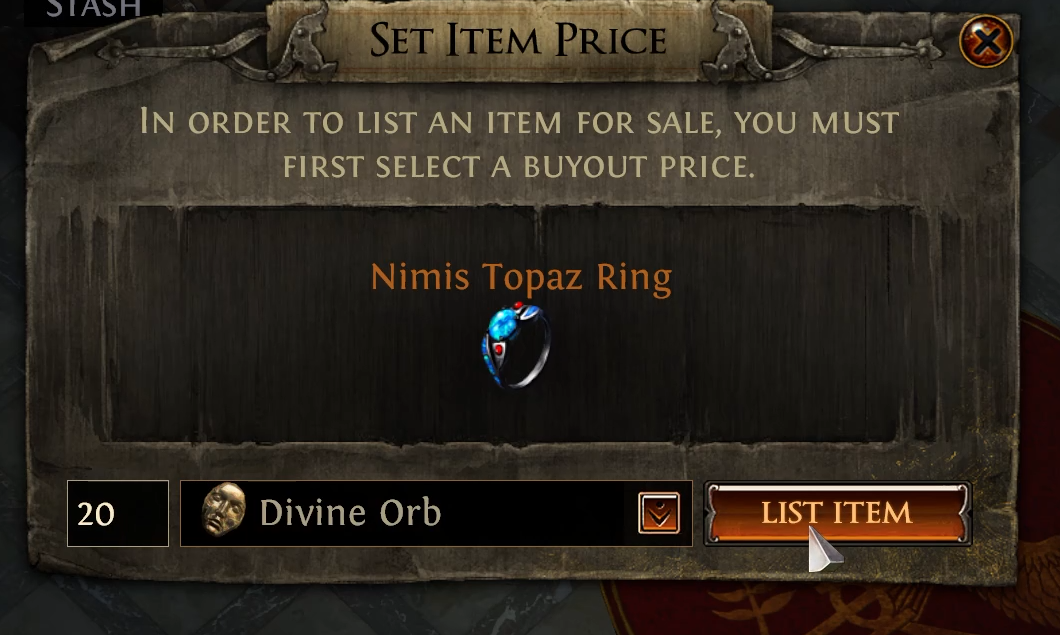
Sales History records your own sales. Since 3.28, hovering over an item name displays the sold item’s details. That is evidence of your transactions, not a database of every market sale. See the official 3.28 notes.
The buyer pays Gold for the purchase; the seller does not pay Gold simply for listing or selling through Merchant’s Tab. A sale can occur while the seller is offline. Each item needs an individual price: even if the interface recalls the previous price, review each listing.
There is an initial grace period before indexing and a cooldown for later removal or changes. Do not assume an active listing can be withdrawn immediately; read the timer before confirming. The official asynchronous trading FAQ documents those restrictions, but it originally describes PoE 2; use 3.27 notes for PoE 1 implementation and the correct NPC. The displayed timer is the operational reference.
Currency Exchange: orders for eligible resources
With Faustus, open Currency Exchange. In I Want, choose what you wish to receive; in I Have, choose what you will give. Check exact resource type, quantities, Market Ratio, total, and Gold Fee before placing the order. Once it executes, review its status and withdraw the received resources or remaining balances as the interface allows.
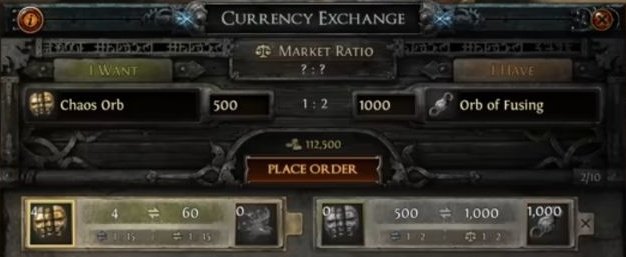
This is for currencies, Scarabs, Essences, Fossils, Fragments, and other eligible resources, not an individual Rare weapon. Merchant’s Tab does not replace Currency Exchange for eligible resources either. An order can depend on offers at your chosen ratio: placing it does not guarantee immediate fulfillment.
Unit price, bulk price, and confirmation safety
If you want 2 Chaos each and sell 10 units, the intended total is 10 × 2 = 20 Chaos. All numbers are hypothetical. Entering 20 into a unit-price field could ask for 200 in total; entering 2 as the bulk price could offer all ten for only 2.
An interface may express price per unit, stack, bundle, or trade ratio. Before confirming, identify the resource, listed quantity, meaning of the field, currency, total, and applicable Gold fee. Read the operation to yourself: “I am giving X to receive Y.” Premium, Merchant, and Exchange do not necessarily interpret identical input the same way.
In manual trade, check base, variant, states, relevant sockets/links, and payment, including after any change. With Merchant’s Tab, your key safeguard is the entered price: buyers do not need to negotiate a correction afterward. In Exchange, confirm direction and ratio, not just two numbers on screen.
Use official project websites, never disclose passwords or authentication codes to intermediaries, and avoid real-money services that breach game rules. You can protect yourself by reviewing offers and transactions without making allegations against sellers.
Repricing, organization, and five searches that change the filters
Reassess prices when competitors appear, a patch changes demand, the league advances, or currency exchange ratios shift. You may keep, lower, remove, use, or store the item. Respect each listing method’s cooldowns; “not sold yet” does not mean “worthless.”
A Dump Tab lets you quickly store promising finds while mapping. Later, sort them: identify items, separate routine drops, research relevant pieces, and list the ones worth your time. Price Tabs can organize price bands when the tab supports them; Merchant’s Tabs still require individual item prices.
Your time is part of the calculation. A manual sale may interrupt content for minimal return, but there is no universally correct minimum trade value: league mode, tab features, and your character’s needs all matter. You do not have to sell every item with any currency value.
| Situation | Filters that make meaningful comparables |
|---|---|
| Fractured Boots with poor other affixes | Base, ilvl, locked affix, tier/roll, and eligibility; do not dismiss the rerollable portion |
| Corrupted Unique | Exact name, variant, specific implicit, and Corrupted state; ordinary copy is only a starting reference |
| Physical Attack weapon | Weapon type/base, pDPS, speed, critical chance, and required skill interactions |
| Large Cluster Jewel | Enchantment, number of added passives, Notables, ilvl, and relevant other affixes |
| Fifty units of a resource | League, exact type, quantity, ratio, bulk total, and applicable Gold fee |
If you find only three close offers, examine functional alternatives and treat the estimate as low-confidence rather than turning the single highest listing into a confirmed price.
Critical mistakes and checklist before listing
| Mistake | Practical correction |
|---|---|
| Search by Rare name, wrong league, or PoE 2 results | Confirm game/league and search actual properties |
| Treat the first listing as a sale or established quote | Compare several offers and their differences |
| Ignore tiers, rolls, implicits, and available slots | Read advanced details and genuine finishing potential |
| Assume every Fractured item is expensive or crafting cost sets a floor | Evaluate usefulness, competition, and the fixed affix |
| Compare a special Unique with its ordinary version | Filter variant, corruption, and legacy properties |
| Search Cluster without Notables or gem without Level/Quality | Use category-specific criteria |
| Treat poe.ninja as an exact price or Awakened without reviewing filters | Use the tools to support, not replace, comparable-offer analysis |
| Confuse Premium, Merchant, and Exchange | Choose an eligible method and know how payment is collected |
| Mix up unit/bulk prices or ignore Gold | Recalculate the total and check fee and order direction |
| Leave listings without review or ignore liquidity | Reconsider competition, strategy, and time |
Before listing:
- ☐ I selected the correct PoE 1 league and identified the base, rarity, and intended buyer.
- ☐ I checked affixes, tiers, rolls, implicits, special states, and available slots.
- ☐ I reviewed Trade and helper-tool filters and compared genuinely equivalent alternatives.
- ☐ I distinguished asking prices from sales, considered liquidity, and chose a price range and strategy.
- ☐ I chose an eligible selling method and know where to collect payment.
- ☐ I checked currency, quantity, unit or bulk price, and intended total.
- ☐ I verified applicable fees, exchange direction, and timers before confirming.
- ☐ I know when to reassess the listing and how much time I am willing to spend trading.
Understand whom an item serves, find comparable alternatives, and set a price consistent with supply, demand, and liquidity. The method still works as market rates change—and helps you decide when to use, keep, or discard an item instead of selling it.
About the Author