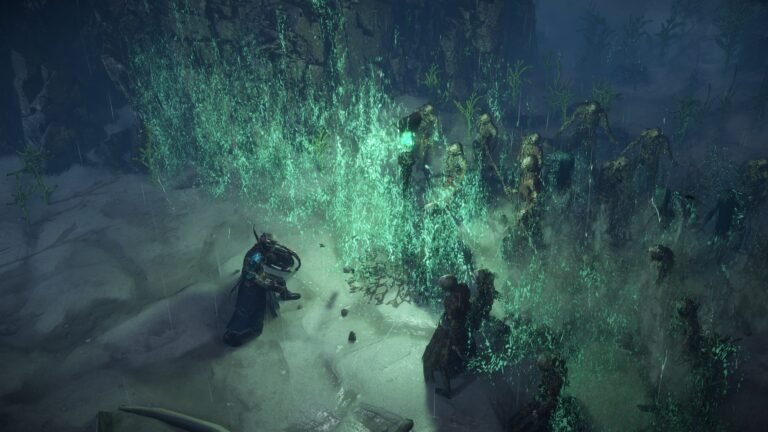
You find your first currencies in Path of Exile and face a choice: use them to improve gear or save them for another purchase? Each currency has a specific practical effect and, when tradeable, a market value that changes over time. This guide explains what each group does, how to evaluate targets, risks and costs, and how to use Faustus’s Currency Exchange.
Reviewed October 26, 2026 — Path of Exile 1, version 3.29, Curse of the Allflame. The official patch notes index listed 3.29.3b as the latest numbered patch checked for this review. The rules concern regular PoE 1; Ruthless and special items may differ. Historical imagery is labeled, and illustrative exchange prices are not current quotations.
Nesta matéria
Currencies, Gold, and market value: essential differences
Currencies are consumable items used for operations such as changing item rarity, modifying affixes or refunding passives. Many also serve as tradeable resources. Their prices depend on usefulness, supply, demand, league and time: Chaos and Divine have no fixed exchange rate. A currency can be technically useful without being worth spending on temporary gear.
Gold matters in the economy, but is not an Orb that players can freely exchange.
| Feature | Currencies | Gold |
|---|---|---|
| Form | Items with distinct names and effects | Balance used for services |
| Direct gear modification | Many perform specific operations | Does not replicate Chaos or Divine |
| Player trading | Many are tradeable in compatible leagues | Not freely transferable like an Orb |
| Currency Exchange | Resource you deliver or receive | Pays the operating fee |
| Other uses | Crafting, preparation and refunds, depending on the item | NPC purchases, Kirac, respeccing and Kingsmarch services |
To obtain Divine by offering Chaos, you need both the required Chaos and Gold to cover the fee. Gold alone does not buy Divine without the requested currency; having enough Chaos does not let you place an order if your Gold is insufficient. Gold is earned through gameplay, including drops and applicable rewards, and picked up nearby under the game’s rules. Plan your balance without assuming that resources committed to Kingsmarch administration are freely available for other services.
How to apply currencies and read rarity and affixes
Crafting modifies or prepares items; trade means player-to-player transactions. Explicit modifiers, or affixes, fall into prefixes and suffixes; an implicit is a separate property. Conventional Magic gear can have one prefix and one suffix, whereas Rare gear can have up to three of each. Jewels and special categories may use different limits.
On PC, the standard procedure is:
- Open inventory with
I, unless your controls differ. - Find the currency and hover over it.
- Read its description and inspect the intended item.
- Check rarity, base, available affix slots, corruption and other restrictions.
- Right-click the currency.
- Left-click an eligible item.
- Read the result before attempting another operation.
On consoles, follow the on-screen controls. Not every currency works on every item: level, influence, modifier count, gear category and special systems can change eligibility.
For example, applying an Orb of Alchemy to an eligible Normal ring makes it Rare, with random affixes. You might obtain useful life and resistances—or modifiers that do not fix your build. Some operations can be repeated; others can lock properties, corrupt or even destroy an item.
Basic currencies: identifying and changing rarity
Scroll of Wisdom identifies eligible items, but you need not identify every drop. Free NPC identification services expanded in 3.27: in 3.29, Isla in Kingsmarch, Niko in Mine Encampment and Einhar in Menagerie can identify items if you can reach them. They do not automatically identify items on the ground. Portal Scroll opens a portal to the appropriate destination, subject to arena and encounter restrictions.
| Currency | Function | Restriction or decision |
|---|---|---|
| Orb of Transmutation | Normal → Magic | Random affixes; cannot select life or resistance |
| Orb of Augmentation | Adds an affix to an eligible Magic item | Needs an available slot; a full prefix and suffix cannot gain a conventional third affix |
| Orb of Alteration | Rerolls eligible Magic affixes | Can erase a useful combination |
| Regal Orb | Magic → Rare, adding a modifier | Previous step is retained; the new modifier is random |
| Orb of Alchemy | Normal → Rare | Random affixes; read map modifiers before opening |
| Orb of Scouring | Removes eligible conventional affixes | Does not remove corruption or erase a Fractured affix; the remaining state matters |
Chaos, Exalted, and Divine: three different operations
Chaos Orb: rerolling and funding upgrades
A Chaos Orb rerolls eligible explicit modifiers on a Rare item. It does not choose a specific affix or guarantee improvement. Protected and special properties follow their own rules: Chaos does not universally erase everything shown in a tooltip.
Chaos also commonly pays for gear and materials. Suppose your ring lacks resistances. You can spend Chaos on random attempts or inspect an already-listed replacement before buying. In a trade league, compare the price of the ready-made fix with the expense and risk of crafting. In SSF, where conventional trading is disabled, the value of your own bases and currencies changes.
Two new Crafting Bench recipes in 3.29 were unlocked by default:
| Operation on eligible Rare gear | Cost |
|---|---|
| Reroll three random modifiers | 3 Chaos Orbs |
| Reroll one random modifier | 8 Chaos Orbs |
Neither recipe is the same as using a regular Chaos Orb to reroll the eligible affix set. Neither lets you select a particular modifier: the target is still random according to the recipe. Put the item in the Bench and check the recipe, eligibility and cost. Do not promise preservation of a specific affix merely because fewer modifiers are changed.

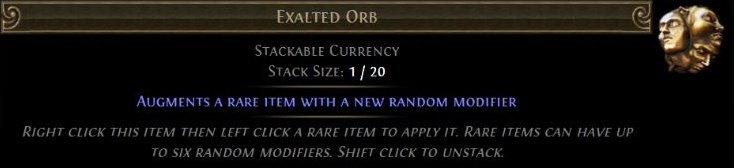
Exalted Orb: adding an affix
An Exalted Orb adds a random modifier to an eligible Rare item with room for one. Conventional gear generally has up to three prefixes and three suffixes; not every category follows those limits. Use advanced descriptions to distinguish them.
An item with two prefixes and two suffixes can accept another affix if no special restriction prevents it, but Exalted does not improve the existing four values or let you select the fifth. The available pool also depends on the base and item conditions. In 3.28, Exalted and Regal became comparatively more common and certain Exalted Gold exchange fees were lowered; Bench recipes previously priced in Exalted generally changed to a cost of four units.
Divine Orb: rerolling a roll, not changing its tier
A Divine Orb randomizes eligible numerical values on existing modifiers. It does not add a normal affix, replace it with a new property or freely upgrade its tier.
Hypothetical example: an existing life affix has a 70–89 range and currently shows 74. Divine could roll another number within that range, including a worse result. If several numerical values are eligible, improving one can worsen another. The tier’s numeric range is different from the list of higher tiers that the base could potentially roll.
In 3.28, the interface began highlighting eligible values while using Divine or Blessed. Certain documented Unique changes may be reflected by Divine on older versions, but do not assume all historical item changes can be transferred this way. Divine is also a commercial reference for higher-value items.
| Item situation | Conventional operation to evaluate | Not guaranteed |
|---|---|---|
| Wrong affixes | Chaos: reroll eligible affixes | Specific life or resistance |
| Good affixes, available slot | Exalted: add an affix | A useful new modifier |
| Desired affixes, weak numerical values | Divine: randomize eligible rolls | Improvement of every roll or affix tier |

The three screenshots are documentary item descriptions displayed by PoEDB, not live crafting performed in the game client. They illustrate the verbs reroll, add and randomize values. No crafting outcome was fabricated.
Annulment, Blessed, Chance, Ancient, Fracturing, and Mirror
| Currency | Function | Main caution |
|---|---|---|
| Annulment | Removes a random eligible modifier | Could remove your strongest affix |
| Blessed | Rerolls numerical values of eligible implicits | Does not replace explicit prefixes |
| Chance | Upgrades Normal to a random rarity | Does not guarantee Unique |
| Ancient | Rerolls an eligible Unique into another of its class | Cannot choose the outcome |
| Fracturing | Fractures one random eligible modifier | Requires a Rare with at least four modifiers |
| Mirror | Creates a mirrored copy of eligible equipment | Consumes a scarce resource and limits crafting on the copy |
Orb of Annulment is not targeted removal. On a Rare item with five affixes, it could remove any eligible one, including an essential build modifier. Blessed Orb rerolls the numerical values of an eligible implicit, separate from explicit prefixes and suffixes; not every implicit can be rerolled.
Orb of Chance upgrades an eligible Normal item to a random rarity, potentially Unique when allowed, but base and Unique eligibility matter. Ancient Orb changes an eligible Unique to another of the same class; since 3.29, it cannot produce a Unique with the same name, as some variants previously allowed. It still cannot guarantee which different Unique you receive.
Fracturing Orb requires an eligible Rare with at least four modifiers and randomly fractures one explicit affix. It does not work on Influenced, Synthesised or already Fractured items. The fractured affix survives many ordinary rerolls, but you cannot freely choose which affix becomes locked. Prepare and inspect the base before spending.
Mirror of Kalandra creates a mirrored copy of eligible non-Unique gear, excluding already Mirrored or Corrupted targets. The original remains, the currency is consumed and the copy gains the Mirrored state that prevents conventional future crafting. It does not duplicate every item category or complete unfinished gear. Its opportunity cost can be huge: finding one does not oblige you to use it before reviewing trading alternatives.
Sockets, links, and Chromatic in version 3.29
Sockets hold gems; links connect compatible skills and supports. The color overhaul did not remove links or make every support work with every skill. See the skill gems, supports and links guide.
Jeweller’s Orb rerolls socket count, subject to gear category and item level; not every base can have six sockets. Orb of Fusing rerolls links among existing sockets: it does not create missing sockets or guarantee a target configuration after a fixed number of uses. Orb of Binding upgrades eligible Normal gear to Rare and provides up to four linked sockets within the item’s limit, not a six-link; the affixes remain random.
In 3.29, sockets added via Jeweller’s, Tainted Jeweller’s, Binding or the Bench are white. Chromatic has a separate color function. Gems now fit sockets of any color, subject to level, attributes, compatibility and links.
A gem in a red, green or blue socket matching its color gets +10% Quality. White provides no such bonus. Quality’s effect depends on the gem and does not universally mean 10% more damage.
How colors spawn. Sockets are white by default, with a small chance of red, green or blue. Non-white color distribution still relates to item attribute requirements; the chance of a non-white socket rises with item level. Chromatic and Tainted Chromatic force one socket to be non-white, while the remaining colors follow normal generation. Gear Quality increases non-white odds. You cannot freely choose every color and position, and rerolling can undo a useful setup.
Bench recipes and practical consequences. Old recipes guaranteeing particular red/green/blue arrangements were removed. Current recipes guarantee minimum numbers of non-white sockets:
| Minimum outcome | Documented cost |
|---|---|
| Two non-white sockets | 5 Chromatic Orbs |
| Three non-white sockets | 20 Chromatic Orbs |
| Four non-white sockets | 75 Chromatic Orbs |
The item must permit the operation. These recipes do not guarantee specific colors for specific gems and do not create links. Chromatic became rarer, stopped being sold by NPCs for Jeweller’s Orbs and received a higher Exchange Gold fee. During the campaign, prioritize usable skill and support links; color matching is now an extra optimization. See GGG’s official 3.29 socket changes.
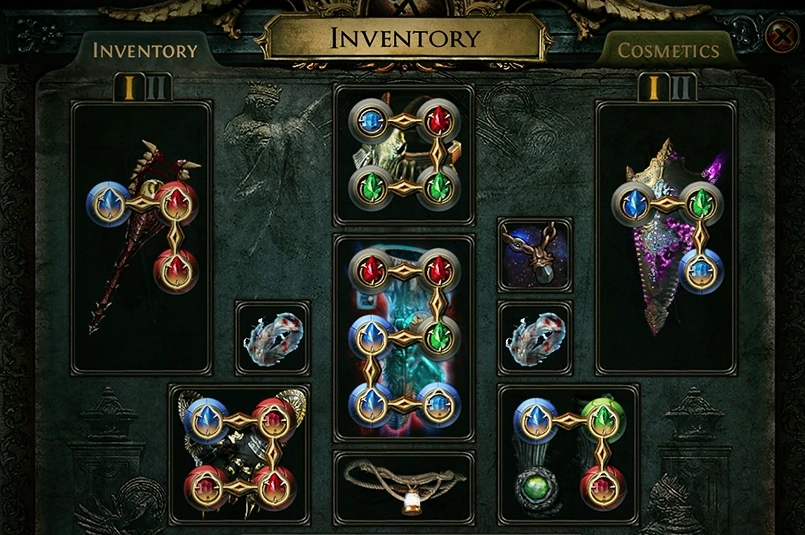
The official 3.29 inventory preview shows linked socket groups. This is not a ZAUS.GG test of Jeweller’s, Fusing or Chromatic. Socket count, link layout and color are three different concerns: get compatible skills and supports working first, then decide whether the Quality bonus is worth its cost.
Quality: gear, gems, flasks, and maps
Quality improves different properties depending on the item. It does not replace a good gear base or desirable affixes; for gems, read the specific Quality effect.
| Currency | Eligible target and general benefit | Caution |
|---|---|---|
| Armourer’s Scrap | Defensive equipment Quality | Improves applicable defensive stats, not every character defense |
| Blacksmith’s Whetstone | Weapon Quality | Conventional physical-damage benefit does not improve all build damage |
| Gemcutter’s Prism | Eligible gem Quality | Gem-specific; does not raise gem level |
| Glassblower’s Bauble | Flask and eligible Tincture Quality | Effect and efficiency depend on category |
| Maven’s Chisels | Specialized map Quality | Each type has its own benefit and replaces other Quality types |
Conventional Quality limits are not infinite; exceeding them depends on particular systems. Corruption or other item properties can restrict application.
In 3.28, standard Cartographer’s Chisels stopped dropping normally and their vendor recipes were removed. Legacy Standard items still work with a reduced effect: 20% Quality provides +10% Item Quantity, not the previous +20%. They are not mandatory for every current-league map. Maven’s variants were also adjusted; Chisels now apply +20% Quality per use. The selected Quality type replaces the previous one rather than stacking all benefits.
| Chisel type | Benefit at 20% Quality after 3.28 |
|---|---|
| Cartographer’s (legacy) | +10% Item Quantity |
| Maven’s of Avarice | 50% more Currency |
| Maven’s of Scarabs | 50% more Scarabs |
| Maven’s of Divination | 50% more Divination Cards |
| Maven’s of Procurement | +40% Item Rarity |
| Maven’s of Proliferation | +10% Monster Pack Size |
Choose a benefit that suits the activity and your budget. More Currency is a map modifier, not a market quote or guaranteed drop. For combined setup with affixes and consumables, see the map modifiers and Scarabs guide.
Vaal, Tainted, and corruption resources
Corruption does not guarantee improvement
Vaal Orb corrupts eligible items and may alter them unpredictably. Outcomes depend on category: equipment, gems and Map Items do not share a universal outcome table. Implicits, affixes, sockets and category-specific properties may change, without a guarantee of improvement.
Using Vaal on an item your build already relies on may produce an unwanted effect and prevent ordinary crafting. On gems, a higher level is not guaranteed. On maps, corruption may fulfill a Bonus Objective requirement, but you must still assess the resulting modifiers. Corrupted restricts normal crafting but does not forbid every specialized action; Tainted currencies and some Bench recipes have their own eligibility and cost.
In 3.29, the Vaal outcome that previously turned a socket white instead changes a random white socket to non-white. Similarly, the Locus of Corruption result that previously made all sockets white now converts whites to non-white.
Tainted currencies and their restrictions
Tainted currencies offer specific operations on eligible corrupted items, with different risks from regular currencies.
| Currency | General operation on eligible Corrupted target | Risk or condition |
|---|---|---|
| Tainted Chromatic | Rerolls socket colors under 3.29 rules | Forces one non-white without choosing all colors |
| Tainted Jeweller’s | Unpredictably adds or removes one socket | Can reduce socket count; new sockets are white |
| Tainted Orb of Fusing | Adds or removes a link in the largest linked group | Can undo progress |
| Tainted Exalted | Adds or removes a modifier on a Corrupted Rare | Can remove a valuable property |
They do not generally remove Corrupted or make all items eligible. Old tutorials using Tainted Chromatic merely to equip a gem no longer apply in the same way: in 3.29 color matching mainly offers a specific Quality bonus.
Volatile Vaal Orb and Crystallised Rancour
Volatile Vaal Orb applies to eligible Unique gear and can randomize modifier values while corrupting the item—or destroy it. It is not a safe Divine or merely a renamed Vaal Orb. Particular values may interact with limits beyond normal ranges, but not universally. In 3.29 it became applicable to items even without modifiers able to exceed normal ranges and was added to Sanctum rewards; the destruction risk remains. Consider how you would replace a required Unique before using it.
Crystallised Rancour is used in certain Horticrafting Station recipes alongside Lifeforce. You do not simply right-click it on any item like Chaos: the recipe specifies the target and resource expenditure. Both gained dedicated Currency Stash Tab slots in 3.29.
Eldritch: implicits, dominance, prefixes, and suffixes
The Eldritch system connects Searing Exarch and Eater of Worlds to special implicits, separate from explicit prefixes and suffixes. Embers and Ichors apply their respective implicits to eligible armor such as helmets, body armor, gloves and boots, subject to base restrictions; they are not universally applicable to weapons or Uniques.
Dominance follows the relative strength of the two implicits. A stronger Exarch implicit means Exarch dominance; equal tiers do not automatically confer dominance just because both symbols are present.
| Resource | Function | Important condition |
|---|---|---|
| Eldritch Embers | Add Searing Exarch implicit | Compatible base |
| Eldritch Ichors | Add Eater of Worlds implicit | Compatible base |
| Orb of Conflict | Randomly raises one implicit’s tier and lowers the other | Needs both; lowering a Lesser implicit removes it |
| Eldritch Chaos | Exarch dominant: rerolls prefixes; Eater dominant: suffixes | Eligible Rare and valid dominance |
| Eldritch Exalted | Exarch dominant: adds a prefix; Eater dominant: a suffix | Eligible Rare with available slot |
| Eldritch Annulment | Exarch dominant: removes a prefix; Eater dominant: a suffix | Eligible Magic/Rare; random within affected group |
If you want to keep armor suffixes while working on prefixes, ensure the correct Eldritch dominance. Getting it backward could modify the very group you wanted to preserve. These operations can target a group, not let you choose the exact affix created or removed.

The documentary Eldritch Chaos entry at PoEDB states the direction: Exarch dominance affects prefixes, Eater dominance affects suffixes. Inspect implicit strength first. The image does not show the author’s character or a crafting attempt.
Regret, Unmaking, and Gold refunds
These currencies refund different passive trees:
| Currency | Resource granted |
|---|---|
| Orb of Regret | One character passive refund point |
| Orb of Unmaking | One Atlas passive refund point |
Consuming the Orb grants the refund resource; you make the change on the matching tree. Unmaking does not remove your build’s character passive, and Regret is not an Atlas point. Tree connections, dependencies and special categories still matter.
Gold is an alternative. Since 3.27, a full character passive respec has been possible for Gold, and Kirac offers individual or full Atlas refunds for Gold. Check the NPC’s current displayed conditions and fees rather than relying on an old fixed price. The passive tree, Masteries and Jewels guide covers character passives in detail.
Essences, Fossils, Resonators, and Catalysts
These all relate to crafting, but do not produce the same effect.
Essences: a promised modifier, not a perfect item. An Essence lists a guaranteed modifier for each supported gear category. If you need life on a ring, you can select an Essence that provides life on rings instead of hoping random Chaos rolls include it. Other affixes still follow the item’s and Essence’s generation rules. Always read the effect for the specific equipment category: the same Essence can behave differently on a weapon and an accessory. Lower tiers apply to Normal items; higher tiers and special types may reroll Rares according to their description. Do not assume every tier works on an already-finished Rare, or that one guaranteed modifier will supply every resistance and attribute you also need.
Fossils and Resonators: steering modifier generation. Fossils affect which types of modifiers are favored, excluded or weighted, subject to their descriptions. Insert compatible Fossils into a Resonator, fill its slots and use the Resonator on an eligible target. These slots are not the equipment’s gem sockets. The materials are consumed, and even directed crafting can produce unsuitable results.
Patch 3.28 concentrated regular Fossil sources in Delve, particularly behind fractured walls and off main routes, removing previous external sources while preserving documented historical Standard exceptions. The current Fractured Fossil description says that it fractures one random modifier, and does not work on Influenced or already Fractured items. Despite its name, it no longer justifies following an obsolete copying method. Review the current item description rather than assuming historical comments are up-to-date item data.
Catalysts: specialized accessory Quality. Catalysts apply Quality to eligible rings, amulets and belts, with specialization affecting matching modifier types. A resistance-related Catalyst does not improve every numerical line on a ring. Check modifier tags, and remember that applying another specialization replaces the prior one rather than stacking all benefits. In 3.29, Ultimatum became the sole conventional Catalyst source; drops from relevant Heist rewards, Expedition chests, Tujen’s shop and Ritual Favours were removed. Maximum stack size increased from ten to twenty.
Other materials and tradeable resources
Not everything of economic value is a Currency Orb. Materials, access fragments and other resources can also be tradeable.
| Resource | System | General function |
|---|---|---|
| Oils | Blight | Anointments and related uses |
| Lifeforce | Harvest | Horticrafting Station operations |
| Rogue’s Markers | Heist | Related services and access |
| Timeless Splinters | Legion | Combining access resources |
| Omens | Special systems | Conditional effects described on the item |
| Scarabs | Atlas | Modifying eligible maps through the Map Device |
| Essences | Essence | Specialized gear crafting |
| Fossils and Resonators | Delve | Specialized crafting |
Identify the category before using or selling it. A Scarab changes map content; an Essence changes gear.
When to spend, save, buy, or craft
Before spending, ask: What problem does this operation solve? How replaceable is the currency? How long will the item be used? Is an alternative recipe or ready-made item better? What loss can I afford? Account for further fixes needed after the attempt. A common orb can solve a campaign bottleneck, while spending a Divine on short-lived gear may exceed the benefit.
Suppose you finished the campaign and need life, Cold Resistance and Lightning Resistance. A crafted ring uses available bases but may roll undesirable affixes; a traded ring lets you examine the listed properties before buying. Compare its asking price, base, number of attempts you can fund, chance of success, time required, availability and resale options. With a limited budget, avoid unlimited rerolls without a stopping rule. Conversely, a cheap Bench recipe may complete an otherwise excellent item.
In SSF, trade is unavailable, so your own bases and materials matter more. Neither buying nor crafting always wins: compare actual solutions to your current needs, not the promise of a perfect item against an inadequate purchase.
For values, check Currency Exchange orders, listings on the official trade site, and the community reference poe.ninja. Select the exact league, mode, date and resource. Listed, indicative, historical and completed-sale prices are different evidence. Equipment bases, affixes, rolls, links and corruption affect comparisons. Standard stockpiles, Hardcore risks and SSF rules make prices and utility different; do not transfer a quote blindly between leagues. For priorities, see the guide to improving your build without wasting currency.
Currency Exchange: complete tutorial with Faustus
The built-in Currency Exchange, managed by Faustus, the Financier, matches orders for eligible stackable currencies and resources. In compatible trade leagues, he is found in Lioneye’s Watch in Act 6; after encountering him there or in Kingsmarch, he becomes available in the hideout. SSF does not provide player-to-player Exchange trading.
Orders may fill entirely, partially or remain open waiting for a counterparty. The original interface appears in GGG’s 2024 tutorial; patch 3.27 documents hideout access after meeting Faustus.
Exchange Chaos for Divine without reversing the direction
In this example, you give Chaos and want Divine:
- Find Faustus and open Currency Exchange; Manage Shop is a separate item-store service.
- Set I Want: Divine Orb and I Have: Chaos Orb.
- Check available Chaos, including resources already committed to other orders. Read the Market Ratio, offered quantities and stock on both sides.
- Enter desired amounts and the quantity you are willing to give. An unmatched ratio may leave the order pending.
- Check Gold Fee and your Gold balance. Read the entire transaction aloud: “I give Chaos to receive Divine, in these quantities and in this league.”
- Select Place Order only when the pair, amounts and costs are correct. Monitor full fills, partial fills and outstanding amounts.
- In the order panel, withdraw the acquired currency and indicated balances. A notification is not a substitute for collection.
- When canceling the unfilled remainder, check the withdrawable balance. Cancellation does not undo completed trades or guarantee a full Gold refund; replacing an order may incur a new fee.
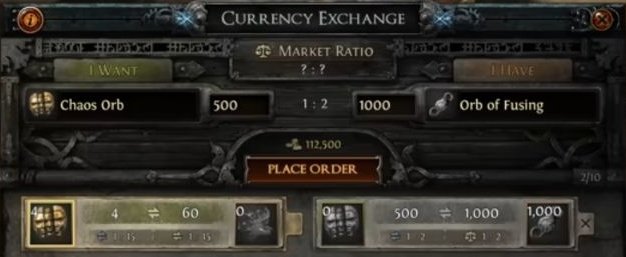
GGG’s 2024 screenshot shows a different pair: receiving Chaos in exchange for Fusing. The Gold fee is displayed above Place Order and the orders below. The figure 112,500 is historical, not today’s fee. Our written instructions specifically demonstrate Divine in I Want and Chaos in I Have; the image is not proof of a current trade completed by ZAUS.GG.
Fees depend on the resource pair and current quantities. Patch 3.27 lowered Gold costs for several basic currencies, 3.28 adjusted costs for Exalted, Exalted Shards and Regal, and 3.29 raised the cost for Chromatic. Recheck the Gold Fee after entering quantities and before placing or recreating an order.
Market Ratio, stock, spread, and liquidity
Consider a purely hypothetical quote: 1 Divine for 150 Chaos. At that price, two Divine would require 300 Chaos plus the Gold fee, assuming enough stock.
The reverse direction may differ. If buying one Divine costs 150 Chaos but selling it returns only 147, the hypothetical spread is 3 Chaos. Repeating the round-trip loses Chaos and may incur Gold fees. Changing between currencies of equivalent value does not magically increase your wealth.
Liquidity describes how easily you can actually execute a particular quantity at the displayed ratio. One Divine might be available at 150 Chaos but the remaining units at less favorable rates; an order for ten could be only partially filled. Market Ratio reflects market conditions, not a universal guaranteed rate. When reversing I Want and I Have, interpret the proportion again: “I give X of this resource and receive Y of that one.”
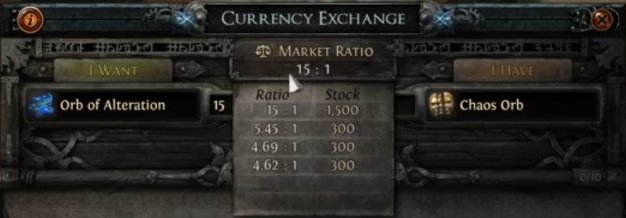
This other 2024 video frame shows Ratio and Stock beside the I Want/I Have fields. Quantity available at a particular ratio limits how much can fill there. These historical offers are not 2026 prices.
Exchange, Trade Site, and Merchant’s Tabs: which one?
| System | What it does | When to use |
|---|---|---|
| Currency Exchange | Matches orders for eligible resources | Converting accepted currencies and materials |
| Trade Site / Trade Market | Searches listings with filters | Finding equipment and comparing offers |
| Conventional direct trade | Transfers items using the trade window | Completing deals that require player contact |
| Merchant’s Tabs | Individual listings for asynchronous sales | Selling through Faustus, including while offline |
The official trade site is for finding listings; the listing determines how the purchase is completed. Its Bulk Item Exchange search is not Faustus’s in-game order panel. Under Manage Shop, Faustus handles Merchant’s Tabs. Automated purchases have eligibility rules and a Gold fee for the buyer, distinct from the fee for posting a Currency Exchange order.
See the complete guide to trading, Faustus and the economy for searching, listings, automated purchases and collecting proceeds. Before any transaction, confirm exact item, quantity, league and payment currency. Check changed direct-trade offers again. Placing an Exchange order is not equivalent to receiving all requested currency. Use official services and never share credentials with someone offering to “verify” an order.
Organizing your stash and updating your filter
Currencies can be stored in ordinary stash tabs. The Currency Stash Tab is a convenience for organization and stacking, not a drop-rate boost or a requirement for gameplay. Without a specialist tab, separate basic currency, crafting materials, maps, mechanic-specific resources and trade stock; keep names and amounts easy to distinguish.
In 3.29, Volatile Vaal Orb and Crystallised Rancour gained dedicated slots and several stack limits changed. Historical product art helps identify the layout but does not verify every slot in the current patch.
A Loot Filter can alter item label color, background, border, size, sounds and minimap icons. It does not improve drop rates or universally determine value. Update it after mechanics change—an old filter might overemphasize Chromatic based on its former purpose and availability. Consult the NeverSink and FilterBlade guide.
Changes in 3.28–3.29 and seasonal resources
Earlier sections explain individual currencies. This summary distinguishes removal, discontinued acquisition and legacy functionality:
| Patch and resource | What matters when consulting old guides |
|---|---|
| 3.28 — Harbinger | Removed from the base game; full Ancient and Fracturing Orbs entered regular drops |
| 3.28 — Engineer’s, Harbinger’s and Horizons | No longer obtainable; existing copies stopped working |
| 3.28 — Ancient, Binding, Engineer’s, Harbinger’s and Horizon Shards | No longer obtainable; old copies removed on login |
| 3.28 — Cartographer’s Chisels | No regular source; legacy copies work with reduced effect |
| 3.28 — Exalted and Regal | Became comparatively more common, with Exalted fees and recipes adjusted |
| 3.28 — Fossils | Conventional sources concentrated in Delve, with documented legacy exceptions |
| 3.29 — Sockets and Bench | Revised color functions; 3/8 Chaos and 5/20/75 Chromatic recipes explained above |
| 3.29 — Catalysts | Regular source moved to Ultimatum; stack size twenty |
| 3.29 — Ancient and Volatile Vaal | Ancient cannot produce the same name; Volatile eligibility expanded and Sanctum added |
| 3.29 — Currency Stash | Dedicated Volatile Vaal and Crystallised Rancour slots |
Do not apply the fate of one removed shard to every similarly named currency. Some stopped dropping but still work in Standard; others stopped functioning entirely. The farm methods catalog places activities in context; always confirm the patch.
Curse of the Allflame has seasonal resources: Ducats support specific league operations, while Charts/Voyages organize exploration. Patch 3.29.3 added six Cursed Ducats, up to three of which may be socketed into the Voyage Planner to modify difficulty and rewards. They are not Chaos or a universal exchange currency. Their future availability depends on GGG; 3.30 was not yet implemented at this article’s revision. Patch 3.29.3 corrected Market Ratio overlap and 3.29.3b adjusted trade search and URLs.
Practical examples, mistakes, and checklist
Example 1 — First currencies in Act 3. You have Transmutation, Alteration, Augmentation, Alchemy and some Chaos. Check the new item’s base, level and attributes, identify your build’s need and choose a matching operation. If a small Magic upgrade solves the issue, you need not consume Chaos to turn every temporary item into Rare. Inspect the result and either keep it, continue within a preset budget or seek an alternative. Common currencies can support leveling without guaranteeing perfect equipment.
Example 2 — Buying a ring after Act 10. You need more resistance. Inspect the character sheet, search for a wearable ring with life and the missing resistances, compare listings and currencies requested, and complete the purchase using the listed method. Examine the item before paying. Once equipped, recheck resistances and ensure the old ring was not supplying attributes required by gems. Here, Chaos was payment, not a reroll of the previous ring.
Example 3 — Divine or Exalted? Item A already has the right affixes with low numerical rolls; Divine can reroll eligible values, potentially for the worse. Item B has good affixes and a spare slot; Exalted can add a random modifier without guaranteeing usefulness. Compare item restrictions and expected benefit against saving or trading the currency. Neither use may be worthwhile. Knowing the effect is not the same as deciding whether the cost is justified.
All examples are educational and hypothetical: ZAUS.GG did not claim personal crafting tests.
Quick troubleshooting before spending
| Problem | First check or fix |
|---|---|
| Currency rejects target | Check rarity, category, corruption, influence and available slots |
| Want to preserve an affix | Read what is affected; regular Annulment and Chaos do not choose a specific result |
| Expect Divine to upgrade a tier | Separate tier and roll: Divine changes eligible numbers, not tiers at will |
| Crafting costs rise without a solution | Set an attempt limit and compare a recipe or ready-made item |
| Exchange order does not fill | Check resource pair, direction, ratio, stock, partial fills and withdrawal |
| Have enough currency, cannot place order | Check Gold Fee and resources reserved in other orders |
| Tutorial recommends old currency or source | Check 3.28–3.29, legacy functionality and PoE 1 vs PoE 2 |
| Listed prices mistaken for wealth | Consider batch size, spread, liquidity and listing versus completed transaction |
Eight-decision checklist
- I identified the currency’s function.
- I checked target eligibility and restrictions.
- I understand the chance of losing or worsening something.
- I checked total cost and my spending limit.
- I compared Bench recipes, buying and other options.
- I verified the patch and gameplay mode.
- I checked trade terms and Gold fees where relevant.
- I will inspect the result before repeating the operation.
Understanding the currency identifies the possible operation. Deciding when to use it requires judging the problem it solves against the cost and risk. You need neither spend every currency nor hoard everything forever.
Sources and credits: official 3.28 notes and 3.29 notes, with current item descriptions displayed by PoEDB. Featured image: historic official Currency Stash Tab product art, GGG (year unconfirmed). Inventory: official 3.29 preview, GGG. Currency tooltip crops: ZAUS.GG documentary captures of public PoEDB pages from October 26, 2026 (PoEDB presentation, GGG item descriptions and artwork), not client screenshots. Exchange frames: GGG’s Introducing the Currency Exchange Market, July 2024, approximately 2:20 and 3:30. Historic values are not current quotes. Enlarge the originals to view details. No personal crafting or trading was claimed.
About the Author