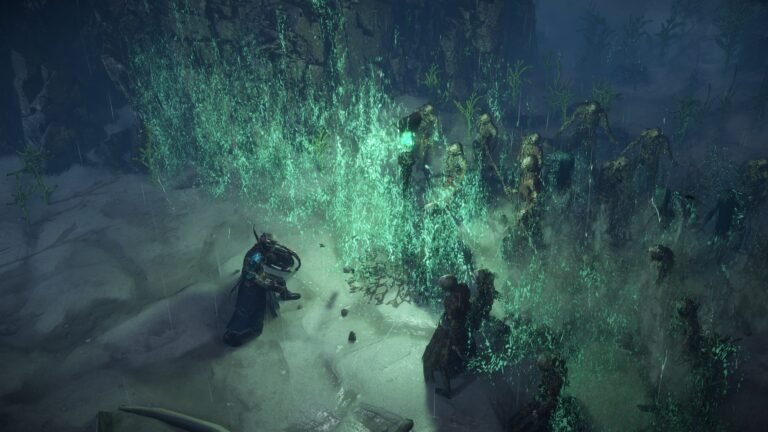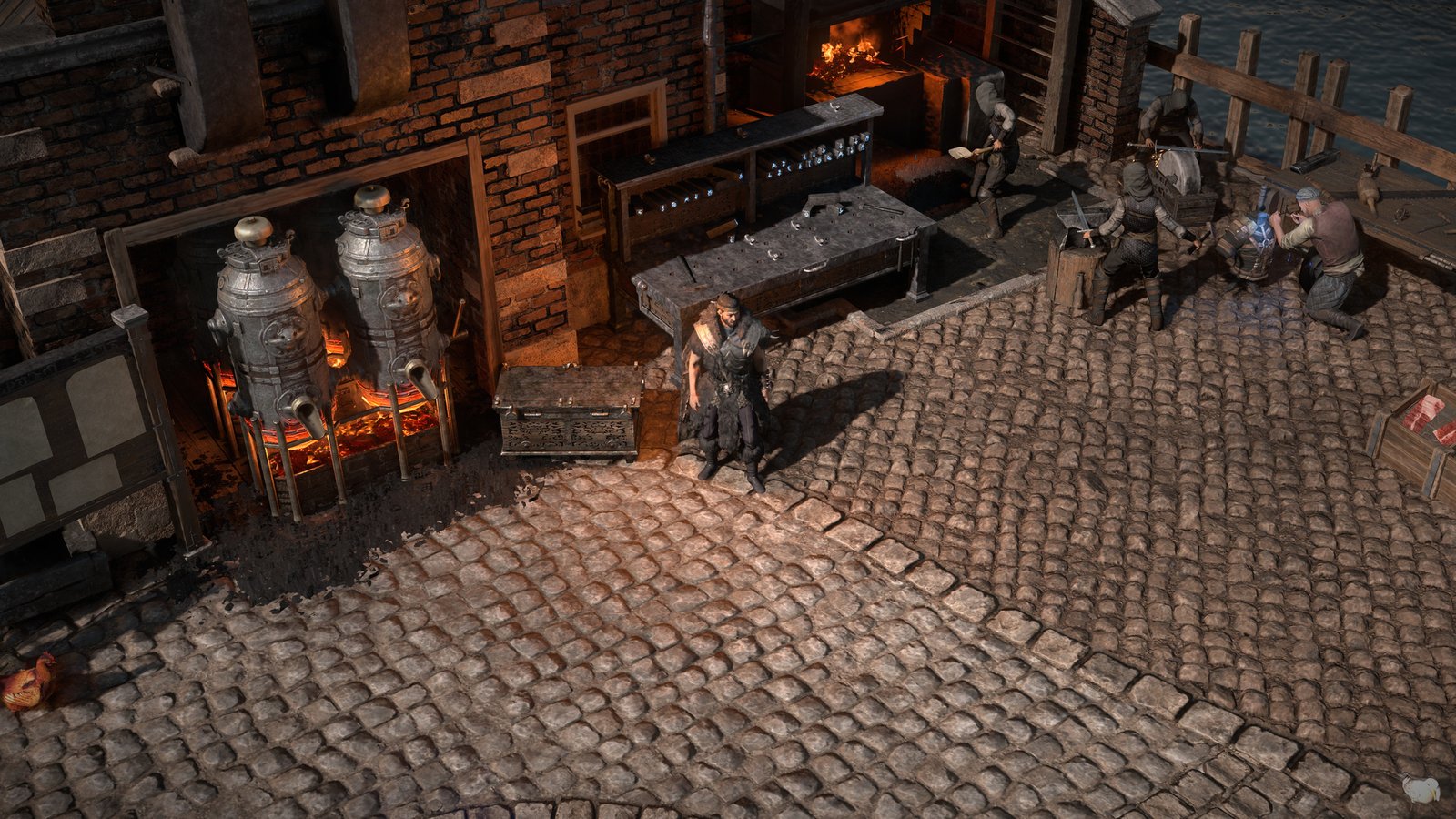
PoE (2024): Dannig na forja de Kingsmarch. Captura oficial histórica: GGG.
You have finished Act 10 in Path of Exile and are preparing for maps. Your ring has Life, Fire Resistance and a useful attribute, but lacks Cold Resistance. Before replacing it, ask whether the item you already own can be improved. If it has a free suffix and you have unlocked a compatible recipe, the Crafting Bench may solve that problem without replacing its other affixes.
Learning to craft does not mean starting with perfect gear carrying six Tier 1 modifiers. It means understanding an item, choosing an operation and obtaining an upgrade that matters to your build. Sometimes adding Life to boots is enough; sometimes an Essence guarantees the main property and the bench finishes the item.
This beginner’s Path of Exile crafting guide covers these procedures, Harvest, Fossils, planning costs and knowing when to stop. It also explains bench, socket and Allflame Crafting changes in patch 3.29. Example outcomes and budgets are illustrative, not our own tests or current market quotes.
Reviewed October 26, 2026. Reference: Path of Exile 1, patch 3.29 — Curse of the Allflame, including maintenance checked through 3.29.3b. We consulted the official patch history. Path of Exile 2 uses different rules.
Nesta matéria
How does crafting work in Path of Exile?
Crafting encompasses methods that create or modify item rarity, affixes, numerical rolls, implicits, Quality, sockets, links and special states. Turning a Normal base into a Rare with Alchemy, adding resistance to a ring, and using an Essence all offer different degrees of control.
| Method | What it provides | Main limitation |
|---|---|---|
| Orb of Alchemy | Turns Normal into Rare | Random affixes |
| Chaos Orb | Reforges an eligible Rare | May replace useful properties |
| Crafting Bench | A specific recipe with a visible cost | Requires room and compatibility |
| Essence | One guaranteed modifier for that item category | Other modifiers remain variable |
| Harvest | Specialized Lifeforce operations | Each recipe has its own rules |
| Fossils | Favor or exclude groups of affixes | Cannot select the entire combination |
| Allflame Crafting | A choice among compatible alternative outcomes | Extra cost and Intangibility |
Steering an outcome does not guarantee the whole item. An Essence that guarantees Life does not simultaneously guarantee Movement Speed, two Resistances and Dexterity. Even a guaranteed modifier category does not automatically grant the best tier. Before using a currency, identify what is guaranteed, what is random and what you may lose.
Before crafting: base, Item Level and affixes
The base determines defenses, requirements and the possible modifier pool. Evasion boots may suit a different build from Armour or Energy Shield boots. Item Level (ilvl) influences which affixes and tiers can roll. Higher ilvl expands eligibility but does not guarantee a good roll and may introduce additional undesirable options.
Ordinary Rare items allow up to three prefixes and three suffixes, while Magic items usually have one of each; special categories and systems can differ. Ordinary elemental resistance modifiers on rings are suffixes. A crafting recipe cannot make a fourth conventional suffix if all three slots are already occupied.
Imagine a ring with Life and Mana prefixes and Fire Resistance and Strength suffixes. One ordinary suffix slot is free, but the recipe must still be compatible with its modifier groups, restrictions and item state.
How to identify free affix slots
Tooltip lines are not affix counts. A hybrid modifier may display more than one stat while taking one slot. For a more detailed explanation, see our equipment, bases and modifiers guide (PT-BR page; localized version pending).
- Open the tooltip and use the advanced description (normally hold Alt on PC; enable it in settings if needed). Keep Item Level separate from Required Level.
- Identify prefixes, suffixes and hybrids; distinguish implicits and special effects from conventional affixes. Check occupied slots, conflicting groups, tags and special states. A Fractured affix still occupies its slot.
- Confirm recipe eligibility at the bench. A free slot does not override group conflicts or category and state restrictions.
Crafting Bench: access, recipes and a ring example
In patch 3.29, a Crafting Bench is available in every town from Act 2 onward; you do not need to wait until you own a hideout. You can also use the bench in your hideout when available. This is documented in the official 3.29 patch notes.
Its menu offers recipes and costs for Life, Resistances, attributes, offensive and defensive properties, sockets, links, colors and special operations. Not everything is unlocked initially: some recipes are discovered during the campaign or in maps. Since patch 3.26, recipes once unlocked by unveiling Veiled items are instead unlocked from recipe objects near Atlas map bosses. Unveiling still changes Veiled items, but is no longer how these bench recipes are unlocked.
For a recipe found in an area, interact with its object, check the unlock confirmation and look for the new bench option. Information about the location of locked recipes helps you plan. You do not need every unlock before Act 10; some belong to the endgame.
Basic bench procedure
The bench modifier occupies an affix slot. Ordinarily, an item permits one bench-crafted modifier; advanced exceptions do not mean you can freely stack multiple Resistances, Life and attributes.r várias resistências, vida e atributos livremente.
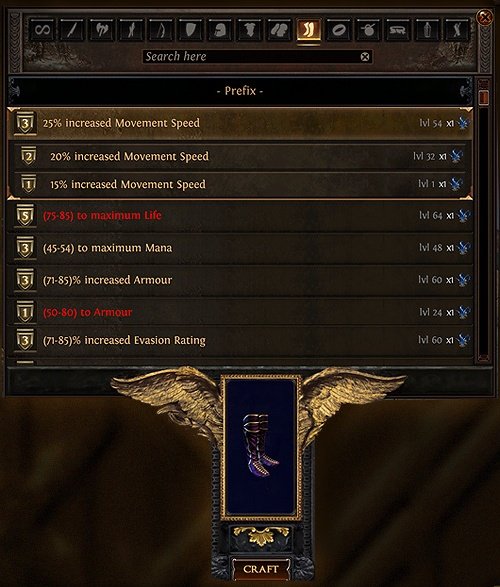
The pictured bench and boots are historical footage from patch 3.5 (2018). It illustrates the interface layout, not current 3.29 costs or values. Check the live interface before spending.
- Open the bench in a town or hideout, insert the item and select the category that addresses your problem.
- Read the recipe and check unlocks, free space, item category, state and modifier-group conflicts.
- Check the resources and amounts to be consumed; confirm only if the benefit justifies the cost.
- Remove the item, read the tooltip and compare it with your whole build.
Return to the Rare ring with Life, Fire Resistance, Strength and one free suffix. The point of bench crafting is to add a useful resistance without replacing the good natural affixes, provided the recipe and item state allow it. This does not guarantee reaching 75% resistance: the actual result depends on its roll, penalties and all other sources. See our defenses guide.
- Check how much Cold Resistance the character is missing and verify the ring’s free suffix in the advanced description.
- Insert it into the bench, select the unlocked compatible recipe, and review its value, cost and conflicts.
- Equip the result and confirm final Cold Resistance, including penalties and other item changes.
Boots, attributes and replacing Crafted Modifiers
Rare boots with Movement Speed, Fire Resistance and Lightning Resistance may still be useful without Life. Because conventional Maximum Life is a prefix on boots, check the prefixes, not merely how many lines appear on the item.
Adding Life to boots
Crafted Life does not have to equal a natural T1 roll to be worthwhile. Without a free prefix, the ordinary recipe cannot exceed the slot limit. Replacing the item may be wiser than gambling away good properties.
To apply it, inspect the available prefix, find a compatible Maximum Life recipe and check its cost. After crafting, compare Life, speed, Resistances, links and requirements with your previous boots. The recipe cannot create a fourth prefix.
Dexterity to equip a gem
If you lack the Dexterity required by a gem, a suitable amulet with a free suffix might fix that shortage. Subtract current Dexterity from the gem requirement, then compare the bench option with a passive, Jewel or different item. Replacing an accessory also removes the attributes it used to provide. Our Skill Gems, Supports and Links guide helps you check what must stay equipped.
Removing or replacing an existing craft
Suppose your boots already have bench-crafted Fire Resistance, but a new ring covers that need. Lightning Resistance might now be better. Eligible Crafted Modifiers can be removed or replaced under the bench rules and at the stated cost.
The Remove Crafted Modifiers recipe uses an Orb of Scouring as its cost. That is not the same as directly using Scouring on the boots: direct use can remove conventional affixes you wanted to keep. Review removal and replacement costs, apply the eligible operation, then reevaluate Resistances in the complete equipment setup.
New bench reroll recipes in patch 3.29
Two recipes are unlocked by default. They are distinct from directly applying a Chaos Orb or using a Divine Orb.
| Bench operation | Cost | What to watch |
|---|---|---|
| Reroll three random modifiers on a Rare | 3 Chaos Orbs | Can affect several useful properties |
| Reroll one random modifier on a Rare | 8 Chaos Orbs | Does not target the worst modifier |
| Apply Chaos Orb directly | 1 Chaos Orb | Reforges eligible Rare modifiers |
The more expensive single-modifier recipe does not let you select the affix. Its scope is narrower, but it could hit your most valuable property. Nor is this the same as merely rerolling numbers within an existing affix tier, the role normally associated with a Divine Orb.
The official notes confirm costs and random selection, not control over a particular affix. Before committing, identify the modifiers that make the item useful, check recipe restrictions and costs, and decide whether you can afford to lose them. Inspect the result before any repeat.
Basic currency: making Magic, making Rare or reforging
Traditional currencies remain useful. For a larger catalogue, see our currency guide (PT-BR page; localized version pending).
| Currency | Main operation on an eligible item |
|---|---|
| Orb of Transmutation | Normal to Magic |
| Orb of Augmentation | Adds an affix to a Magic item with space |
| Orb of Alteration | Rerolls Magic affixes |
| Regal Orb | Magic to Rare, adding a modifier |
| Orb of Alchemy | Normal to Rare |
| Chaos Orb | Reforges Rare |
| Orb of Scouring | Removes eligible conventional affixes |
| Exalted Orb | Adds a random modifier to a Rare with space |
| Orb of Annulment | Removes a random eligible modifier |
| Divine Orb | Rerolls eligible numerical values of affixes |
A first project using Transmutation and Alteration
- Select the appropriate item category and base; check its Item Level against the modifiers you want.
- Use an Orb of Transmutation to make the Normal item Magic; inspect the affixes.
- If unsuitable, consider Orb of Alteration, repeating only within your predefined budget.
- If there is room for another affix, consider Orb of Augmentation.
- Evaluate the resulting prefix and suffix and decide whether to stop, continue or use a Regal Orb to make it Rare.
Regal adds a random modifier rather than the specific complement you wanted. An Essence or a dropped item may be a cheaper answer for temporary equipment.
Making a Rare with Orb of Alchemy
- Select a suitable Normal base; inspect Item Level, equipping requirements and currency eligibility.
- Apply Orb of Alchemy and inspect all resulting modifiers.
- Identify what benefits the build, check remaining slots and possible bench finishing.
- Compare with your current gear before committing more resources.
Rare is a rarity, not proof of quality. Alchemy does not promise Life and two Resistances. Repeatedly applying Chaos to chase combinations (Chaos Spamming) may consume many attempts without a fixed guarantee. Compare currency cost, base value, Essences, bench, Harvest and a ready-made item rather than rerolling indefinitely.
Essences: one guaranteed modifier, other rolls variable
Essences come from trapped Essence monsters. On eligible Normal gear they create a Rare with the property specified for that item category; Screaming-tier and higher conventional Essences can also reforge eligible Rares. Lower conventional tiers are for Normal items.
Tier progression: Whispering → Muttering → Weeping → Wailing → Screaming → Shrieking → Deafening. Special corrupted Essences also exist. Read the actual tooltip instead of following outdated reroll-threshold advice.
An Essence’s property changes by equipment category. Greed can grant Maximum Life on Boots, Gloves and Helmets, but its ring and amulet effects are Life Regeneration. Select the effect actually displayed for your target item.
Example: Boots and Screaming Essence of Greed
The current PoEDB tooltip gives +61 to +75 Maximum Life on Boots. That modifier is guaranteed, not a complete set of perfect boots.
| Property | Guaranteed in this operation? |
|---|---|
| +61–75 Maximum Life on Boots | Yes, by the Essence modifier |
| Movement Speed | No |
| Fire or Cold Resistance | No |
| Free slot for bench finishing | No |
| Better than your current boots | Depends on the build and other affixes |
Finishing the result at the Crafting Bench
Consider a hypothetical outcome: the Essence Life prefix plus Movement Speed, and Fire Resistance as a suffix. If the item is still eligible, you may have room for Cold Resistance via the bench. This combines a guaranteed key property with useful random affixes and targeted finishing.
- Pick eligible boots with the right base, ilvl, requirements and item state; read the Essence’s Boots effect.
- Apply it according to the game interface. Life is guaranteed, but speed, other Resistances and free slots are not.
- Compare the roll with your old boots. If a compatible suffix is free, check the missing Cold Resistance and the bench cost.
- Equip and check gems, links, attributes and Resistances; stop when the objective is met. Another Essence could erase a good result.
Harvest: Lifeforce and the Horticrafting Station
Harvest uses Wild, Vivid and Primal Crystallised Lifeforce, plus special resources for some recipes. Modern Harvest stores resources for operations performed at the Horticrafting Station in your hideout: you do not rebuild the 2020 seed garden or save temporary crafts as in old versions.
In maps, enter The Sacred Grove, inspect the plant pairs and choose an encounter. Defeat its monsters and collect Lifeforce. After your first Harvest, find the station in hideout decorations, place it using the edit interface and consult its recipes. The 3.19 rework explains the change to Lifeforce-funded crafts.
Available operations include equipment reforges, conversions and specialized actions. Reforge, augment and convert are different. A recipe referring to Life does not necessarily preserve existing Life or other affixes.
Your first Harvest reforge
- Select an item you can risk changing, with an appropriate base and ilvl.
- Define the desired modifier type, such as Life or Fire; open the Horticrafting Station.
- Insert an eligible item and find the appropriate recipe.
- Read whether it guarantees a property, favors a category or performs another operation.
- Check replaced affixes, restrictions, Lifeforce type and amount, then accept the risk of losing existing modifiers.
- Execute, inspect the new affixes and free slots, and compare bench finishing, another attempt or stopping.
| Criterion | Essence | Harvest |
|---|---|---|
| Resource | The selected Essence | Lifeforce required by the recipe |
| Targeting | Property for that item category | The operation stated at the station |
| Other outcomes | Usually random | Recipe-dependent |
| Key decision | Does the guaranteed property solve the problem? | Does the operation do what the project needs? |
In 3.29, the Harvest option to turn an item into Synthesised was removed. Non-Unique Synthesised items also ceased to be normally obtainable, with the officially stated exception involving corruption of Synthesis Uniques into Rares. Do not follow an outdated station recipe for producing a normal Rare Synthesised base.
Fossils and Resonators: targeting affix groups
Fossils, associated with Delve, change modifier generation by favoring some groups and blocking others. A Resonator holds Fossils and applies the operation; variants have different socket counts. This steers the possible outcomes but cannot guarantee every affix or tier.
A Fossil favoring Life improves its generation under compatible conditions, but the result may still lack the other properties you need. Compare the total cost with an Essence, Harvest or a finished item. In patch 3.28, conventional Fossil sources outside Delve were removed, while spawns behind fractured walls and off the main paths became more frequent, according to the official notes. This changed farming sources, not the guarantee of better crafting results.
First Fossil craft
- Choose an appropriate base and ilvl; define the modifier group you want.
- Research candidate Fossils and select a Resonator with enough slots.
- Insert a compatible Fossil combination, reviewing combined effects and blocked groups.
- Confirm item eligibility, apply the Resonator and accept that eligible affixes may be replaced.
- Inspect every resulting modifier; decide whether to finish, try again or stop.
You may be able to remove Fossils from an incomplete Resonator, but do not rely on recovering resources after completing and using the combination. Craft of Exile helps compare the restrictions of each Fossil group.
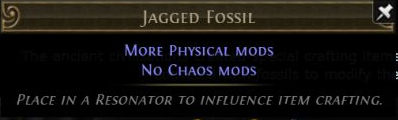
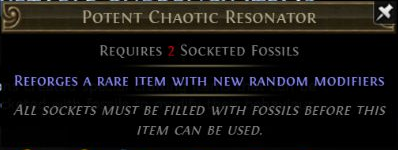
These are historical official 3.4 (2018) Delve tooltips, not screenshots taken in this review: Jagged Fossil highlights Physical modifiers and excludes Chaos, while Potent Chaotic Resonator uses two Fossils and requires all slots filled. Check current modifier pools and compatibility before crafting.
Bestiary and Fractured items: further possibilities
Bestiary, with Einhar, involves capturing beasts and using unlocked recipes at the Menagerie. It is useful, but not necessary for your first ring upgrade.
In 3.29, the old two-item splitting recipe was replaced with one that fractures a modifier on a Rare Talisman with at least four modifiers. The old three-item splitting recipe was replaced with one that fractures two modifiers on a Rare Talisman with at least six modifiers. These are specific recipes, not a universal way to split ordinary gear.
A Fractured item has a fixed modifier that remains through certain compatible operations. If Fire Resistance is Fractured on boots, a compatible reforge might search for Life and Movement Speed without rerolling that suffix. It still uses an affix slot, and an unwanted fixed affix may actually hinder the project. Some systems are incompatible with Fractured items.
Fractured Fossils also changed in 3.29: they now fracture a random modifier and cannot be applied to already Fractured or Influenced items, as described in the 3.29 item notes. Do not confuse the name with its former duplication function or expect to select an affix. A Fracturing Orb does not simply let you choose which modifier to lock either.
Sockets, links and colors in patch 3.29
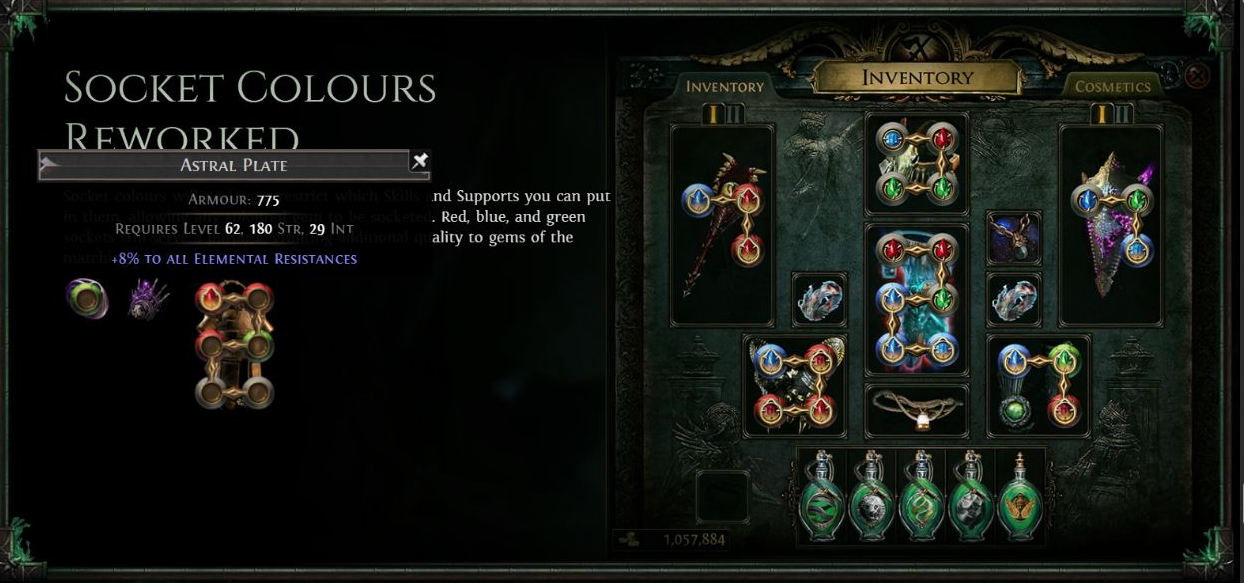
Gems now fit sockets of any color. Red, green and blue still matter: matching a colored socket to the gem color grants +10% Quality for that gem. Sockets normally generate white, with a chance to roll colors influenced by item level.
Separate socket count (how many gems fit), links (which compatible skill and support gems interact) and colors (the opportunity for the Quality bonus). This does not remove linking requirements or override category and ilvl socket limits.
Jeweller’s Orb and Orb of Fusing
Jeweller’s Orb changes the number of sockets. Check present count, maximum, base, ilvl, existing links and cost before using it. Sockets added by Jeweller’s and corresponding bench operations are white under the 3.29 rules.
Orb of Fusing changes links. Six sockets do not necessarily mean six linked sockets. Compare a bench recipe, random Fusing attempts and a ready-to-use item. A few Orbs do not guarantee six links; extra links also do not make incompatible Support Gems work together.
Chromatic Orb and new bench recipes
Chromatic Orb forces at least one socket to be non-white; other colors follow current generation. It does not choose an exact color. Chromatics became rarer and are no longer sold by NPCs for Jeweller’s Orbs.
| Current bench recipe | Cost |
|---|---|
| At least 2 non-white sockets | 5 Chromatic Orbs |
| At least 3 non-white sockets | 20 Chromatic Orbs |
| At least 4 non-white sockets | 75 Chromatic Orbs |
Old recipes for exact colors were removed. Four non-white sockets do not necessarily mean four blue sockets; red, green and blue combinations remain possible. You no longer need Chromatics merely to insert a gem, only to pursue worthwhile matching-color bonuses.
Quality and corruption: choosing the order
Quality benefits vary by item type. On ordinary weapons it may improve local physical damage; on defensive equipment, Armour, Evasion or Energy Shield. Gems and flasks have their own effects. Physical Quality on a caster Wand does not automatically improve Spell Damage.
| Quality currency | General application |
|---|---|
| Blacksmith’s Whetstone | Weapons |
| Armourer’s Scrap | Defensive equipment |
| Gemcutter’s Prism | Gems |
| Glassblower’s Bauble | Flasks |
In 3.29, higher Quality also increases the chance of colored sockets in relevant operations. This is separate from its ordinary damage or defense bonus. There is no universal rule to apply Quality before every craft: consider rarity, item state, method, resources and value.
A Vaal Orb may corrupt an eligible item, restricting later operations. Corrupting boots that still need Life, Cold Resistance or links may block the project. Some specialized exceptions exist, but ordinary currencies do not automatically work on Corrupted gear. When the plan requires it, finish important conventional improvements before considering corruption, which can also make an item worse.
Divine, Exalted, Annulment and advanced techniques
Divine Orb rerolls eligible numerical values of existing affixes; it does not upgrade a low tier to T1 and may improve or worsen a value inside its range. Exalted Orb adds a random modifier to a Rare with room, not necessarily a useful one. Orb of Annulment removes a random eligible modifier: an item with five good affixes and one bad affix is not guaranteed to lose the bad one.
Metacrafting and Recombinators
Advanced modifiers such as Prefixes Cannot Be Changed, Suffixes Cannot Be Changed, Cannot roll Attack Modifiers, Cannot roll Caster Modifiers and Can have up to 3 Crafted Modifiers allow more deliberate plans. They are not universal safeguards: different operations respect them differently, and the metacraft itself can occupy an affix slot. The three-crafted-modifier limit counts that modifier itself.
Recombinators combine properties of items under specific eligibility, cost and outcome rules. Knowing the system exists is useful, but beginners do not need to master it merely to add Life or Resistance. Use methods whose potential loss you understand.
Allflame Crafting: Vesper, Sulphur and Ghostly Copies
Allflame Crafting is a seasonal system in Curse of the Allflame, linked to Vesper aboard The Sovereign. Progression includes Charts, seabed exploration and Voyages; follow the ship’s missions and available services. Do not confuse Vesper’s system with the regular town bench.
During exploration, Allflame Lanterns can recover resources from the seabed, including Dead Man’s Sulphur, spent in ship crafting. When you insert an eligible item and select an operation, Vesper can produce Ghostly Copies: alternative results from which you select one to keep. The others do not remain stored for later selection.
Sulphur costs and the number of copies depend on the operation. The official example pictured with four copies represents that particular operation, not a universal price or four-choice guarantee. Check the current interface before committing an item or buying materials.
Intangibility and Ducats
Many Allflame operations add a percentage of Intangibility. This represents the chance that a later Allflame craft produces just one Ghostly Copy, eliminating the benefit of choosing between alternatives. It does not directly reduce weapon damage; it limits repeated crafting on that item.
Ducats have specialized effects. The official Rotmother’s Ducat tooltip describes adding a Trap or Mine modifier to an eligible Rare Belt via the ship system. That is not a universal replacement for Chaos or Divine and does not mean every equipment category supports the same effect. Always inspect the specific Ducat’s restrictions, cost and possible outcomes. The material is referenced to the official 3.29 presentation and Intangibility data.

First crafting attempt with Vesper
- Speak to Vesper aboard the ship. Pick an eligible item and a concrete goal, then select compatible operation and resources.
- Check Dead Man’s Sulphur, other costs, available alternatives and Intangibility before committing.
- If you accept the risk, execute and review every Ghostly Copy, including affixes lost by each alternative.
- Select one copy to keep; the others are lost. Reevaluate before trying another operation.
Not every regular currency or recipe applies here, and you do not need Vesper for routine campaign upgrades. The ordinary bench may solve the problem with less cost and complexity.
Craft of Exile: research and simulate before spending
Craft of Exile is a community tool for exploring bases, affixes, tiers, weights, methods and estimates. The project recommends its updated interface for full PoE 1 3.29 support, including Allflame. The tool’s own data version numbers are not the names of official GGG patches.
Check whether a desired affix exists on the base, the required ilvl, conflicting groups and possible method outcomes. Simulation is not a guarantee for a particular attempt and may lag behind hotfixes.
What does a 10% chance mean?
In an invented mathematical example with independent attempts and a constant 10% success probability, the expected number of attempts until the first success is 1 ÷ 0.10 = 10. This does not promise success on exactly the tenth attempt. After ten failures/success opportunities, the chance of still having no success is 0.90¹⁰ ≈ 34.9%. These figures are not actual PoE Essence, Fossil or bench odds.
- Open the tool, confirm PoE 1 and its data version; set the actual category, base, ilvl and item states.
- Enter desired affixes and minimum rolls, then choose a method and conditions.
- Calculate or simulate, compare alternatives, and check the tool’s implementation limitations.
- Use current league and game-mode costs; treat results as budget estimates, not promises.
Craft or buy: budget and when to stop
In Trade leagues, buying gives known properties and an asking price; crafting may customize gear and make use of bases and resources. Neither is always best. Boots with Life, Movement Speed and two Resistances might cost less than many crafting attempts, or the exact configuration may be hard to find.
In Solo Self-Found (SSF), normal player-to-player trading is unavailable. A valuable Essence you would sell in Trade may be your best chance to upgrade gear. Compare options actually available in your game mode.
Setting a budget: fictional values
| Component | Hypothetical units |
|---|---|
| Base | 5 |
| Essences used | 12 |
| Bench finishing | 3 |
| Total | 20 |
5 + 12 + 3 = 20 units. If an equivalent finished item is offered for 18, buying may be cheaper by 2 units in this fictitious example. These are not market prices. Confirm that the items are genuinely comparable and that the advertised offer is available; a listing does not prove a sale.
Materials already in your stash are not economically free in Trade, since they can have alternate uses or resale value. Failed attempts count toward total cost; craft cost does not establish resale value. For more context, see our Trade, Faustus and economy guide (PT-BR page; localized version pending).
- Set a minimum acceptable outcome, separating essential upgrades from optional ones.
- Compare complete attempt and finishing costs, including failed attempts and the material’s alternative uses, with other crafts or a finished item.
- Set a spending cap that will not block progression. Stop when you meet the goal or reach the cap; reconsider before returning.
Ask whether the next currency fixes a real problem or merely aims to perfect gear that already works. A sufficiently good item may be better kept while you upgrade a weak weapon.
Priorities in the campaign, maps and SSF
| Stage | Priority | Methods to consider |
|---|---|---|
| Campaign | Life, Resistances, attributes, weapon and links | Bench, available Essences, common currency |
| Early maps | Fix defenses and weak pieces | Bench, Essences, found bases |
| Mid-tier maps | Improve affixes and skill setup | Essences, Harvest, Fossils according to the goal |
| Advanced endgame | Specialized planned projects | Special bases, metacrafting and other systems |
| SSF | Upgrades possible using your own resources | Available methods and intentionally saved bases |
After Act 10, reassess Resistances with campaign penalties, Life or Energy Shield, recovery, weapon, gems, links and attribute requirements. You do not need six perfect affixes on every Rare before entering red maps. Fix what actually holds the character back, as discussed in our after-campaign guide.
Complete example: upgrade a character without spending everything
Imagine a spellcaster who just completed the campaign and needs more survivability. The ring has Life and Fire Resistance but lacks Cold Resistance. The boots have little Life and inadequate Movement Speed; the weapon already has useful Spell modifiers. You have common currencies and Essences. This is a teaching scenario, not a ZAUS.GG gameplay report.
- Inspect the ring’s affixes and confirm a free suffix.
- Fix Cold Resistance with a compatible bench recipe; check the character sheet afterward.
- Choose a suitable boots base, considering defenses, requirements, ilvl and eligibility.
- Use a Greed Essence that explicitly guarantees Life on Boots.
- Read the result: Life, Movement Speed, Resistances and remaining weaknesses.
- If an eligible slot and affordable recipe remain, finish the boots at the bench.
- Check gem sockets and links. In 3.29 you need not chase colors simply to equip gems.
- Assess the weapon for Spell Damage, Cast Speed, gem levels and relevant effects, not just physical DPS.
- Compare changes with Path of Building and record resources spent.
- Stop once the objective is solved; save the rest for the next meaningful upgrade.
This did not require a Divine Orb, corruption, metacrafting, Recombinators or Allflame Crafting. Advanced methods may become relevant later; here, understanding the problem and applying a suitable operation was enough.
Troubleshooting and a pre-spending checklist
| Mistake | Useful check |
|---|---|
| Counting tooltip lines or mixing up ilvl and requirements | Advanced description, hybrids, free slots, groups and states |
| Accidentally destroying useful gear | Operation’s scope: finishing, reforge, add, remove or numerical reroll |
| Repeating indefinitely | Minimum target, running costs and stop rule |
| Confusing colors, links and Quality | Patch 3.29 rules, currency function and the actual skill |
| Following outdated recipes or overestimating protection | Current version, item category, compatibility and restrictions |
| Comparing prices of different items | Build value, essential affixes, losses, attempts and Trade/SSF |
- Before: establish the goal and verify base, ilvl, requirements, affixes, state and eligibility.
- Before: confirm the recipe is unlocked; understand its scope, cost, risks and budget cap.
- Before: check gems, links, attributes and defenses, and consider other crafts or buying.
- After: inspect the tooltip and losses, and reassess requirements and Resistances with all gear equipped.
- After: record expenses, compare against the minimum target, and decide to stop or redesign the project.
Crafting begins with a specific problem
A resistance recipe that lets you progress safely is already successful crafting. Once you understand the base, free slots and what an operation changes, the bench, Essences, Harvest and Fossils stop being blind clicks.
Identify the need, confirm compatibility, compare risk and cost, and work within a budget. Preserve functional outcomes when another gamble offers little real benefit. That habit prepares you for advanced projects without risking your character’s entire stash on a first upgrade.
Image sources: official Grinding Gear Games materials for Allflame (3.29), Betrayal (3.5, 2018) and Delve (3.4, 2018). Faithful crops, no numerical edits; no open license is claimed. Historical images do not establish current prices or costs. Open the originals for full size.
About the Author